Nagios 是一款流行的开源监控软件。它会维护整个 IT 基础架构的清单,并确保您的网络、服务器、应用程序、服务和进程正常运行。如果关键基础架构组件发生故障,Nagios 会发送通知警报。
本教程介绍如何在 Debian 9 上安装和配置最新版本的 Nagios Core。
前提条件
您需要以具有 sudo 访问权限的用户身份登录,才能安装软件包。
在 Debian 上安装 Nagios
以下步骤介绍了如何从源代码安装最新版本的 Nagios Core。
首先安装编译和运行 Nagios 所需的以下软件包:
sudo apt update && sudo apt upgradesudo apt install autoconf gcc libc6 make wget unzip apache2 php libapache2-mod-php7.0 libgd-devsudo apt install libmcrypt-dev libssl-dev bc gawk dc build-essential libnet-snmp-perl gettext1. 下载 Nagios
进入 /usr/src 目录,并使用 wget 从项目的 Github 仓库下载最新版本的 Nagios:
cd /usr/src/sudo wget https://github.com/NagiosEnterprises/nagioscore/archive/nagios-4.4.3.tar.gz下载完成后,解压 tar 文件:
sudo tar zxf nagios-*.tar.gz在继续执行后续步骤之前,请确保通过输入以下命令切换到 Nagios 源代码目录:
cd nagioscore-nagios-*/2. 编译 Nagios
通过运行 configure 脚本来启动构建过程:
sudo ./configure --with-httpd-conf=/etc/apache2/sites-enabled成功完成后,您将看到以下消息:
*** Configuration summary for nagios 4.4.3 2019-01-15 ***: General Options: ------------------------- Nagios executable: nagios Nagios user/group: nagios,nagios Command user/group: nagios,nagios Event Broker: yes Install ${prefix}: /usr/local/nagios Install ${includedir}: /usr/local/nagios/include/nagios Lock file: /run/nagios.lock Check result directory: /usr/local/nagios/var/spool/checkresults Init directory: /lib/systemd/system Apache conf.d directory: /etc/apache2/sites-enabled Mail program: /usr/sbin/sendmail Host OS: linux-gnu IOBroker Method: epoll Web Interface Options: ------------------------ HTML URL: http://localhost/nagios/ CGI URL: http://localhost/nagios/cgi-bin/ Traceroute (used by WAP): /usr/sbin/tracerouteReview the options above for accuracy. If they look okay,type 'make all' to compile the main program and CGIs.运行 make 命令以启动构建过程:
sudo make all编译可能需要一些时间,具体取决于您的系统。构建过程完成后,您将看到类似以下内容:
*** Compile finished ***...Enjoy.3. 创建 Nagios 用户和组
要创建新的系统 nagios 用户和组,请输入:
sudo make install-groups-users将 Apache 的 www-data 用户添加到 nagios 组中:
sudo usermod -a -G nagios www-data4. 安装 Nagios 二进制文件
运行以下命令来安装 Nagios 二进制文件、CGI 和 HTML 文件:
sudo make install您应该看到以下输出:
*** Main program, CGIs and HTML files installed ***5. 创建外部命令目录
通过输入以下命令创建外部命令目录并设置适当的权限:
sudo make install-commandmode*** External command directory configured ***6. 安装 Nagios 配置文件
使用以下命令安装示例 Nagios 配置文件:
sudo make install-config*** Config files installed ***Remember, these are *SAMPLE* config files. You'll need to readthe documentation for more information on how to actually defineservices, hosts, etc. to fit your particular needs.7. 安装 Apache 配置文件
以下命令将创建 Apache 配置文件:
sudo make install-webconf*** Nagios/Apache conf file installed ***确保已启用 Apache 的 rewrite 和 cgi 模块:
sudo a2enmod rewritesudo a2enmod cgi8. 创建 Systemd Unit 文件
以下命令会安装 systemd unit 文件,并使 Nagios 服务能够在开机时启动。
sudo make install-daemoninit...*** Init script installed ***9. 创建用户账户
要能够访问 Nagios Web 界面,您需要创建一个管理员用户。
在本教程中,我们将创建一个名为 nagiosadmin 的用户:
sudo htpasswd -c /usr/local/nagios/etc/htpasswd.users nagiosadmin系统将提示您输入并确认该用户的密码。
New password: Re-type new password: Adding password for user nagiosadmin重启 Apache 服务以使更改生效:
sudo systemctl restart apache210. 配置防火墙
防火墙将保护您的服务器免受不必要的流量影响。
如果您的服务器上尚未配置防火墙,可以查看我们关于如何在 Debian 上使用 ufw 设置防火墙的指南
通过输入以下命令开放 Apache 端口:
sudo ufw allow Apache安装 Nagios 插件
切换回 /usr/src 目录,并从项目的 Github 仓库下载最新版本的 Nagios 插件:
cd /usr/src/sudo wget -O nagios-plugins.tar.gz https://github.com/nagios-plugins/nagios-plugins/archive/release-2.2.1.tar.gz下载完成后,通过输入以下命令解压 tar 文件:
sudo tar zxf nagios-plugins.tar.gz切换到插件源代码目录:
cd nagios-plugins-release-2.2.1逐一运行以下命令来编译并安装 Nagios 插件:
sudo ./tools/setupsudo ./configuresudo makesudo make install启动 Nagios
现在您已经在 Debian 服务器上安装了 Nagios,请使用以下命令启动它:
sudo systemctl start nagios要验证 Nagios 是否正在运行,请检查服务状态:
sudo systemctl status nagios输出应类似于以下内容,表明 Nagios 服务处于活动状态并正在运行。
● nagios.service - Nagios Core 4.4.3 Loaded: loaded (/lib/systemd/system/nagios.service; enabled; vendor preset: enabled) Active: active (running) since Sun 2019-02-10 17:07:21 CST; 9s ago Docs: https://www.nagios.org/documentation Process: 26241 ExecStart=/usr/local/nagios/bin/nagios -d /usr/local/nagios/etc/nagios.cfg (code=exited, status=0/SUCCESS) Process: 26239 ExecStartPre=/usr/local/nagios/bin/nagios -v /usr/local/nagios/etc/nagios.cfg (code=exited, status=0/SUCCESS) Main PID: 26243 (nagios) Tasks: 6 (limit: 4915) CGroup: /system.slice/nagios.service访问 Nagios Web 界面
要访问 Nagios Web 界面,请打开您喜欢的浏览器,并输入服务器的域名或公网 IP 地址,后跟 /nagios:
url
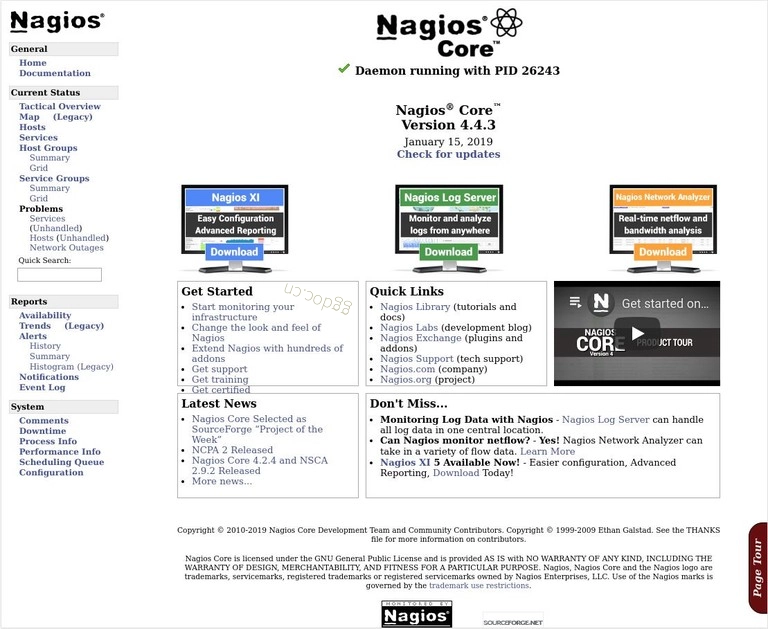
http(s)://your_domain_or_ip_address/nagios输入 nagiosadmin 用户的登录凭据,您将被重定向到默认的 Nagios 主页,如下图所示: