简介
Laravel MCP 为 AI 客户端通过 Model Context Protocol 与您的 Laravel 应用程序交互提供了一种简单而优雅的方式。它提供了表达力强且流畅的接口,用于定义服务器、工具、资源和提示,从而实现与应用程序的 AI 驱动交互。
安装
要开始使用,请使用 Composer 包管理器将 Laravel MCP 安装到您的项目中:
composer require laravel/mcp发布路由
安装 Laravel MCP 后,执行 vendor:publish Artisan 命令以发布 routes/ai.php 文件,您将在此文件中定义您的 MCP 服务器:
php artisan vendor:publish --tag=ai-routes此命令会在您应用程序的 routes 目录中创建 routes/ai.php 文件,您将使用该文件来注册您的 MCP 服务器。
创建服务器
您可以使用 make:mcp-server Artisan 命令创建 MCP 服务器。服务器作为中心通信点,向 AI 客户端暴露如工具、资源和提示等 MCP 功能:
php artisan make:mcp-server WeatherServer此命令将在 app/Mcp/Servers 目录中创建一个新服务器类。生成的服务器类扩展了 Laravel MCP 的基础 Laravel\Mcp\Server 类,并提供了用于配置服务器以及注册工具、资源和提示的属性及属性:
<?php

namespace App\Mcp\Servers;

use Laravel\Mcp\Server\Attributes\Instructions;
use Laravel\Mcp\Server\Attributes\Name;
use Laravel\Mcp\Server\Attributes\Version;
use Laravel\Mcp\Server;

#[Name('Weather Server')]
#[Version('1.0.0')]
#[Instructions('This server provides weather information and forecasts.')]
class WeatherServer extends Server
{
    /**
     * 与此 MCP 服务器注册的工具。
     *
     * @var array<int, class-string<\Laravel\Mcp\Server\Tool>>
     */
    protected array $tools = [
        // GetCurrentWeatherTool::class,
    ];

    /**
     * 与此 MCP 服务器注册的资源。
     *
     * @var array<int, class-string<\Laravel\Mcp\Server\Resource>>
     */
    protected array $resources = [
        // WeatherGuidelinesResource::class,
    ];

    /**
     * 与此 MCP 服务器注册的提示。
     *
     * @var array<int, class-string<\Laravel\Mcp\Server\Prompt>>
     */
    protected array $prompts = [
        // DescribeWeatherPrompt::class,
    ];
}
服务器注册
创建服务器后,您必须在 routes/ai.php 文件中对其进行注册,使其可被访问。Laravel MCP 提供了两种注册服务器的方法:web 用于 HTTP 可访问的服务器,local 用于命令行服务器。
Web 服务器
Web 服务器是最常见的服务器类型,可通过 HTTP POST 请求访问,非常适合远程 AI 客户端或基于 Web 的集成。使用 web 方法注册 Web 服务器:
use App\Mcp\Servers\WeatherServer;
use Laravel\Mcp\Facades\Mcp;

Mcp::web('/mcp/weather', WeatherServer::class);
就像普通路由一样,您可以应用中间件来保护您的 Web 服务器:
Mcp::web('/mcp/weather', WeatherServer::class)
    ->middleware(['throttle:mcp']);
本地服务器
本地服务器作为 Artisan 命令运行,非常适合构建本地 AI 助手集成,例如 Laravel Boost。使用 local 方法注册本地服务器:
use App\Mcp\Servers\WeatherServer;
use Laravel\Mcp\Facades\Mcp;

Mcp::local('weather', WeatherServer::class);
注册后,通常不需要手动运行 mcp:start Artisan 命令。相反,请配置您的 MCP 客户端(AI 代理)以启动服务器或使用 MCP Inspector。
缓存提示
Laravel MCP 在可能缓存的响应中包含缓存提示,例如服务器发现、基本列表和资源读取。默认情况下,这些响应标记为私有,生存时间(TTL)为零毫秒。
您可以使用 Cacheable 属性自定义服务器的默认缓存提示:
use Laravel\Mcp\Enums\CacheScope;
use Laravel\Mcp\Server\Attributes\Cacheable;

#[Cacheable(ttlMs: 60_000, scope: CacheScope::Public)]
class WeatherServer extends Server
{
    /**
     * 获取各个 MCP 方法的缓存提示。
     *
     * @return array<string, \Laravel\Mcp\Server\Attributes\Cacheable>
     */
    protected function cacheHints(): array
    {
        return [
            'tools/list' => new Cacheable(ttlMs: 30_000, scope: CacheScope::Public),
        ];
    }
}
CacheScope::Private 范围将缓存响应限制在同一授权上下文中,而 CacheScope::Public 允许响应在用户之间共享。缓存提示仅供参考;MCP 客户端或主机决定响应是否实际被缓存。cacheHints 返回的方法特定提示优先于服务器的 Cacheable 属性。
您可以通过将 Cacheable 属性应用于资源类,来覆盖服务器对单个资源的缓存提示:
#[Cacheable(ttlMs: 300_000, scope: CacheScope::Public)]
class WeatherGuidelinesResource extends Resource
{
    // ...
}
资源的 Cacheable 属性优先级高于方法特定的提示和服务器的默认提示。
工具
工具使您的服务器能够暴露 AI 客户端可调用的功能。它们允许语言模型执行操作、运行代码或与外部系统交互:
<?php

namespace App\Mcp\Tools;

use Illuminate\Contracts\JsonSchema\JsonSchema;
use Laravel\Mcp\Request;
use Laravel\Mcp\Response;
use Laravel\Mcp\Server\Attributes\Description;
use Laravel\Mcp\Server\Tool;

#[Description('获取指定位置的当前天气预报。')]
class CurrentWeatherTool extends Tool
{
    /**
     * 处理工具请求。
     */
    public function handle(Request $request): Response
    {
        $location = $request->get('location');

        // 获取天气...

        return Response::text('天气是...');
    }

    /**
     * 获取工具的输入模式。
     *
     * @return array<string, \Illuminate\JsonSchema\Types\Type>
     */
    public function schema(JsonSchema $schema): array
    {
        return [
            'location' => $schema->string()
                ->description('要获取天气的位置。')
                ->required(),
        ];
    }
}
创建工具
要创建工具,请运行 make:mcp-tool Artisan 命令:
php artisan make:mcp-tool CurrentWeatherTool创建工具后,在服务器的 $tools 属性中注册它:
<?php

namespace App\Mcp\Servers;

use App\Mcp\Tools\CurrentWeatherTool;
use Laravel\Mcp\Server;

class WeatherServer extends Server
{
    /**
     * 与此 MCP 服务器关联的工具。
     *
     * @var array<int, class-string<\Laravel\Mcp\Server\Tool>>
     */
    protected array $tools = [
        CurrentWeatherTool::class,
    ];
}
可搜索的工具目录
拥有大量工具的服务器可以将部分工具放入可搜索目录中,而不是向 AI 客户端通告所有工具。可搜索目录暴露两个工具:search_tools,它根据工具名称、描述和输入模式搜索目录;以及 execute_tools,它调用由搜索返回的一个或多个工具。
要创建可搜索目录,请在服务器的 $tools 属性中使用 ToolSearch 类作为数组键:
<?php

namespace App\Mcp\Servers;

use App\Mcp\Tools\CurrentWeatherTool;
use App\Mcp\Tools\HistoricalWeatherTool;
use App\Mcp\Tools\WeatherAlertsTool;
use Laravel\Mcp\Server;
use Laravel\Mcp\Server\Tools\ToolSearch;

class WeatherServer extends Server
{
    /**
     * 与此 MCP 服务器关联的工具。
     *
     * @var array<int|string, \Laravel\Mcp\Server\Tool|class-string<\Laravel\Mcp\Server\Tool>|array<int, \Laravel\Mcp\Server\Tool|class-string<\Laravel\Mcp\Server\Tool>>>
     */
    protected array $tools = [
        CurrentWeatherTool::class,

        ToolSearch::class => [
            HistoricalWeatherTool::class,
            WeatherAlertsTool::class,
        ],
    ];
}在此示例中,CurrentWeatherTool 直接通告,而历史天气和天气警报工具可通过可搜索目录获得。当搜索或执行目录工具时,仍会尊重条件工具注册。
单次 execute_tools 调用中可执行的最大工具数量以及最大响应大小由 mcp.tool_search.max_tool_calls 和 mcp.tool_search.max_output_bytes 配置值控制。
工具名称、标题和描述
默认情况下,工具的名称和标题源自类名。例如,CurrentWeatherTool 将具有名称 current-weather 和标题 Current Weather Tool。您可以使用 Name 和 Title 属性自定义这些值:
use Laravel\Mcp\Server\Attributes\Name;
use Laravel\Mcp\Server\Attributes\Title;

#[Name('get-optimistic-weather')]
#[Title('获取乐观天气预报')]
class CurrentWeatherTool extends Tool
{
    // ...
}
工具描述不会自动生成。您应始终使用 Description 属性提供有意义的描述:
use Laravel\Mcp\Server\Attributes\Description;

#[Description('获取指定位置的当前天气预报。')]
class CurrentWeatherTool extends Tool
{
    //
}
描述是工具元数据的关键部分,因为它有助于 AI 模型理解何时以及如何有效地使用该工具。
工具输入模式
工具可以定义输入模式以指定它们从 AI 客户端接受哪些参数。使用 Laravel 的 Illuminate\Contracts\JsonSchema\JsonSchema 构建器来定义工具的输入要求:
<?php

namespace App\Mcp\Tools;

use Illuminate\Contracts\JsonSchema\JsonSchema;
use Laravel\Mcp\Server\Tool;

class CurrentWeatherTool extends Tool
{
    /**
     * 获取工具的输入 schema。
     *
     * @return array<string, \Illuminate\JsonSchema\Types\Type>
     */
    public function schema(JsonSchema $schema): array
    {
        return [
            'location' => $schema->string()
                ->description('要查询天气的地点。')
                ->required(),

            'units' => $schema->string()
                ->enum(['celsius', 'fahrenheit'])
                ->description('要使用的温度单位。')
                ->default('celsius'),
        ];
    }
}
工具输出 Schema
工具可以定义 输出 schemas 以指定其响应的结构。这使得需要可解析工具结果的 AI 客户端能够更好地集成。使用 outputSchema 方法定义工具的输出结构:
<?php

namespace App\Mcp\Tools;

use Illuminate\Contracts\JsonSchema\JsonSchema;
use Laravel\Mcp\Server\Tool;

class CurrentWeatherTool extends Tool
{
    /**
     * 获取工具的输出 schema。
     *
     * @return array<string, \Illuminate\JsonSchema\Types\Type>
     */
    public function outputSchema(JsonSchema $schema): array
    {
        return [
            'temperature' => $schema->number()
                ->description('摄氏温度')
                ->required(),

            'conditions' => $schema->string()
                ->description('天气状况')
                ->required(),

            'humidity' => $schema->integer()
                ->description('湿度百分比')
                ->required(),
        ];
    }
}
验证工具参数
JSON Schema 定义提供了工具参数的基本结构,但您可能还希望强制执行更复杂的验证规则。
Laravel MCP 与 Laravel 的 验证功能 无缝集成。您可以在工具的 handle 方法内验证传入的工具参数:
<?php

namespace App\Mcp\Tools;

use Laravel\Mcp\Request;
use Laravel\Mcp\Response;
use Laravel\Mcp\Server\Tool;

class CurrentWeatherTool extends Tool
{
    /**
     * 处理工具请求。
     */
    public function handle(Request $request): Response
    {
        $validated = $request->validate([
            'location' => 'required|string|max:100',
            'units' => 'in:celsius,fahrenheit',
        ]);

        // 使用验证后的参数获取天气数据...
    }
}
在验证失败时,AI 客户端将根据您提供的错误消息采取行动。因此,提供清晰且可操作的错误消息至关重要:
$validated = $request->validate([
    'location' => ['required','string','max:100'],
    'units' => 'in:celsius,fahrenheit',
],[
    'location.required' => '您必须指定一个地点来查询天气。例如,"纽约市" 或 "东京"。',
    'units.in' => '您必须指定 "celsius" 或 "fahrenheit" 作为单位。',
]);
工具依赖注入
Laravel 服务容器 用于解析所有工具。因此,您可以在构造函数中为工具可能需要的任何依赖项进行类型提示。声明的依赖项将自动被解析并注入到工具实例中:
<?php

namespace App\Mcp\Tools;

use App\Repositories\WeatherRepository;
use Laravel\Mcp\Server\Tool;

class CurrentWeatherTool extends Tool
{
    /**
     * 创建新的工具实例。
     */
    public function __construct(
        protected WeatherRepository $weather,
    ) {}

    // ...
}
除了构造函数注入外,您还可以在工具的 handle() 方法中对依赖项进行类型提示。当调用该方法时,服务容器将自动解析并注入依赖项:
<?php

namespace App\Mcp\Tools;

use App\Repositories\WeatherRepository;
use Laravel\Mcp\Request;
use Laravel\Mcp\Response;
use Laravel\Mcp\Server\Tool;

class CurrentWeatherTool extends Tool
{
    /**
     * 处理工具请求。
     */
    public function handle(Request $request, WeatherRepository $weather): Response
    {
        $location = $request->get('location');

        $forecast = $weather->getForecastFor($location);

        // ...
    }
}
工具注解
您可以使用 注解 增强您的工具,以便向 AI 客户端提供额外的元数据。这些注解有助于 AI 模型理解工具的行为和能力。注解通过属性添加到工具中:
<?php

namespace App\Mcp\Tools;

use Laravel\Mcp\Server\Tools\Annotations\IsIdempotent;
use Laravel\Mcp\Server\Tools\Annotations\IsReadOnly;
use Laravel\Mcp\Server\Tool;

#[IsIdempotent]
#[IsReadOnly]
class CurrentWeatherTool extends Tool
{
    //
}
可用的注解包括:
| 注解 | 类型 | 描述 |
|---|---|---|
#[IsReadOnly] | boolean | 指示工具不会修改其环境。 |
#[IsDestructive] | boolean | 指示工具可能会执行破坏性更新(仅在非只读时有意义)。 |
#[IsIdempotent] | boolean | 指示使用相同参数重复调用不会产生额外效果(在非只读时)。 |
#[IsOpenWorld] | boolean | 指示工具可能会与外部实体交互。 |
注解值可以使用布尔参数显式设置:
use Laravel\Mcp\Server\Tools\Annotations\IsReadOnly;
use Laravel\Mcp\Server\Tools\Annotations\IsDestructive;
use Laravel\Mcp\Server\Tools\Annotations\IsOpenWorld;
use Laravel\Mcp\Server\Tools\Annotations\IsIdempotent;
use Laravel\Mcp\Server\Tool;

#[IsReadOnly(true)]
#[IsDestructive(false)]
#[IsOpenWorld(false)]
#[IsIdempotent(true)]
class CurrentWeatherTool extends Tool
{
    //
}
条件注册工具
您可以通过在工具类中实现 shouldRegister 方法,在运行时条件性地注册工具。此方法允许您根据应用程序状态、配置或请求参数来确定是否应提供该工具:
<?php

namespace App\Mcp\Tools;

use Laravel\Mcp\Request;
use Laravel\Mcp\Server\Tool;

class CurrentWeatherTool extends Tool
{
    /**
     * 确定是否应注册该工具。
     */
    public function shouldRegister(Request $request): bool
    {
        return $request?->user()?->subscribed() ?? false;
    }
}
当工具的 shouldRegister 方法返回 false 时,它将不会出现在可用工具列表中,且 AI 客户端无法调用它。
工具响应
工具必须返回一个 Laravel\Mcp\Response 实例。Response 类提供了几种便捷方法来创建不同类型的响应:
对于简单的文本响应,请使用 text 方法:
use Laravel\Mcp\Request;
use Laravel\Mcp\Response;

/**
 * 处理工具请求。
 */
public function handle(Request $request): Response
{
    // ...

    return Response::text('天气摘要:晴朗,72°F');
}
若指示工具执行过程中发生错误,请使用 error 方法:
return Response::error('无法获取天气数据。请重试。');若要返回图像或音频内容,请使用 image 和 audio 方法:
return Response::image(file_get_contents(storage_path('weather/radar.png')), 'image/png');

return Response::audio(file_get_contents(storage_path('weather/alert.mp3')), 'audio/mp3');
您也可以使用 fromStorage 方法直接从 Laravel 文件系统磁盘中加载图像和音频内容。MIME 类型将从文件中自动检测:
return Response::fromStorage('weather/radar.png');如有需要,您可以指定特定的磁盘或覆盖 MIME 类型:
return Response::fromStorage('weather/radar.png', disk: 's3');

return Response::fromStorage('weather/radar.png', mimeType: 'image/webp');
多内容响应
工具可以通过返回 Response 实例数组来返回多个内容片段:
use Laravel\Mcp\Request;
use Laravel\Mcp\Response;

/**
 * 处理工具请求。
 *
 * @return array<int, \Laravel\Mcp\Response>
 */
public function handle(Request $request): array
{
    // ...

    return [
        Response::text('天气摘要:晴朗,72°F'),
        Response::text("**详细预报**\n- 早晨:65°F\n- 下午:78°F\n- 晚上:70°F")
    ];
}
结构化响应
工具可以使用 structured 方法返回结构化内容。这为 AI 客户端提供了可解析的数据,同时保持与 JSON 编码文本表示的向后兼容性:
return Response::structured([
    'temperature' => 22.5,
    'conditions' => 'Partly cloudy',
    'humidity' => 65,
]);
如果您需要在结构化内容的同时提供自定义文本,请在响应工厂上使用 withStructuredContent 方法:
return Response::make(
    Response::text('天气为 22.5°C 且晴朗')
)->withStructuredContent([
    'temperature' => 22.5,
    'conditions' => 'Sunny',
]);
流式响应
对于长时间运行的操作或实时数据流,工具可以从其 handle 方法返回生成器。这使得在向客户端发送最终响应之前,能够发送中间更新:
<?php

namespace App\Mcp\Tools;

use Generator;
use Laravel\Mcp\Request;
use Laravel\Mcp\Response;
use Laravel\Mcp\Server\Tool;

class CurrentWeatherTool extends Tool
{
    /**
     * 处理工具请求。
     *
     * @return \Generator<int, \Laravel\Mcp\Response>
     */
    public function handle(Request $request): Generator
    {
        $locations = $request->array('locations');

        foreach ($locations as $index => $location) {
            yield Response::notification('processing/progress', [
                'current' => $index + 1,
                'total' => count($locations),
                'location' => $location,
            ]);

            yield Response::text($this->forecastFor($location));
        }
    }
}
在使用基于 Web 的服务器时,流式响应会自动打开一个 SSE(Server-Sent Events)流,将每个生成的消息作为事件发送给客户端。
Prompts
Prompts 允许您的服务器共享可重用的提示模板,供 AI 客户端用于与语言模型交互。它们提供了一种标准化方式来构建常见查询和交互。
创建 Prompts
要创建 prompt,请运行 make:mcp-prompt Artisan 命令:
php artisan make:mcp-prompt DescribeWeatherPrompt创建 prompt 后,将其注册到服务器的 $prompts 属性中:
<?php

namespace App\Mcp\Servers;

use App\Mcp\Prompts\DescribeWeatherPrompt;
use Laravel\Mcp\Server;

class WeatherServer extends Server
{
    /**
     * 此 MCP 服务器注册的 prompts。
     *
     * @var array<int, class-string<\Laravel\Mcp\Server\Prompt>>
     */
    protected array $prompts = [
        DescribeWeatherPrompt::class,
    ];
}
Prompt 名称、标题和描述
默认情况下,prompt 的名称和标题源自类名。例如,DescribeWeatherPrompt 将具有名称 describe-weather 和标题 Describe Weather Prompt。您可以使用 Name 和 Title 属性自定义这些值:
use Laravel\Mcp\Server\Attributes\Name;
use Laravel\Mcp\Server\Attributes\Title;

#[Name('weather-assistant')]
#[Title('Weather Assistant Prompt')]
class DescribeWeatherPrompt extends Prompt
{
    // ...
}
Prompt 描述不会自动生成。您应始终使用 Description 属性提供有意义的描述:
use Laravel\Mcp\Server\Attributes\Description;

#[Description('Generates a natural-language explanation of the weather for a given location.')]
class DescribeWeatherPrompt extends Prompt
{
    //
}
描述是 prompt 元数据的关键部分,因为它有助于 AI 模型理解何时以及如何最好地利用该 prompt。
Prompt 参数
Prompts 可以定义参数,允许 AI 客户端使用特定值自定义 prompt 模板。使用 arguments 方法定义您的 prompt 接受的参数:
<?php

namespace App\Mcp\Prompts;

use Laravel\Mcp\Server\Prompt;
use Laravel\Mcp\Server\Prompts\Argument;

class DescribeWeatherPrompt extends Prompt
{
    /**
     * 获取 prompt 的参数。
     *
     * @return array<int, \Laravel\Mcp\Server\Prompts\Argument>
     */
    public function arguments(): array
    {
        return [
            new Argument(
                name: 'tone',
                description: 'The tone to use in the weather description (e.g., formal, casual, humorous).',
                required: true,
            ),
        ];
    }
}
验证 Prompt 参数
Prompt 参数会根据其定义自动进行验证,但您可能还想强制执行更复杂的验证规则。
Laravel MCP 与 Laravel 的 验证功能 无缝集成。您可以在 prompt 的 handle 方法内验证传入的 prompt 参数:
<?php

namespace App\Mcp\Prompts;

use Laravel\Mcp\Request;
use Laravel\Mcp\Response;
use Laravel\Mcp\Server\Prompt;

class DescribeWeatherPrompt extends Prompt
{
    /**
     * 处理 prompt 请求。
     */
    public function handle(Request $request): Response
    {
        $validated = $request->validate([
            'tone' => 'required|string|max:50',
        ]);

        $tone = $validated['tone'];

        // 使用给定的 tone 生成 prompt 响应...
    }
}
在验证失败时,AI 客户端将根据您提供的错误消息采取行动。因此,提供清晰且可操作的错误消息至关重要:
$validated = $request->validate([
    'tone' => ['required','string','max:50'],
],[
    'tone.*' => 'You must specify a tone for the weather description. Examples include "formal", "casual", or "humorous".',
]);
Prompt 依赖注入
Laravel 服务容器 用于解析所有 prompts。因此,您可以在构造函数中对 prompt 所需的任何依赖项进行类型提示。声明的依赖项将自动被解析并注入到 prompt 实例中:
<?php

namespace App\Mcp\Prompts;

use App\Repositories\WeatherRepository;
use Laravel\Mcp\Server\Prompt;

class DescribeWeatherPrompt extends Prompt
{
    /**
     * 创建新的提示实例。
     */
    public function __construct(
        protected WeatherRepository $weather,
    ) {}

    //
}
除了构造函数注入外,您还可以在提示的 handle 方法中为依赖项指定类型。当调用该方法时,服务容器将自动解析并注入这些依赖项:
<?php

namespace App\Mcp\Prompts;

use App\Repositories\WeatherRepository;
use Laravel\Mcp\Request;
use Laravel\Mcp\Response;
use Laravel\Mcp\Server\Prompt;

class DescribeWeatherPrompt extends Prompt
{
    /**
     * 处理提示请求。
     */
    public function handle(Request $request, WeatherRepository $weather): Response
    {
        $isAvailable = $weather->isServiceAvailable();

        // ...
    }
}
条件式提示注册
您可以通过在提示类中实现 shouldRegister 方法,在运行时有条件地注册提示。此方法允许您根据应用程序状态、配置或请求参数来确定是否应提供某个提示:
<?php

namespace App\Mcp\Prompts;

use Laravel\Mcp\Request;
use Laravel\Mcp\Server\Prompt;

class CurrentWeatherPrompt extends Prompt
{
    /**
     * 确定是否应注册该提示。
     */
    public function shouldRegister(Request $request): bool
    {
        return $request?->user()?->subscribed() ?? false;
    }
}
当提示的 shouldRegister 方法返回 false 时,它将不会出现在可用提示列表中,AI 客户端也无法调用它。
提示响应
提示可以返回单个 Laravel\Mcp\Response 或 Laravel\Mcp\Response 实例的可迭代集合。这些响应封装了将发送给 AI 客户端的内容:
<?php

namespace App\Mcp\Prompts;

use Laravel\Mcp\Request;
use Laravel\Mcp\Response;
use Laravel\Mcp\Server\Prompt;

class DescribeWeatherPrompt extends Prompt
{
    /**
     * 处理提示请求。
     *
     * @return array<int, \Laravel\Mcp\Response>
     */
    public function handle(Request $request): array
    {
        $tone = $request->string('tone');

        $systemMessage = "You are a helpful weather assistant. Please provide a weather description in a {$tone} tone.";

        $userMessage = "What is the current weather like in New York City?";

        return [
            Response::text($systemMessage)->asAssistant(),
            Response::text($userMessage),
        ];
    }
}
您可以使用 asAssistant() 方法来指示某条响应消息应被视为来自 AI 助手,而常规消息则被视为用户输入。
资源
Resources 使您的服务器能够暴露数据和内容,供 AI 客户端在阅读和使用这些数据作为与语言模型交互时的上下文。它们提供了一种共享静态或动态信息(如文档、配置或任何有助于告知 AI 响应的数据)的方式。
创建资源
要创建资源,请运行 make:mcp-resource Artisan 命令:
php artisan make:mcp-resource WeatherGuidelinesResource创建资源后,请在服务器的 $resources 属性中对其进行注册:
<?php

namespace App\Mcp\Servers;

use App\Mcp\Resources\WeatherGuidelinesResource;
use Laravel\Mcp\Server;

class WeatherServer extends Server
{
    /**
     * 与此 MCP 服务器注册的资源。
     *
     * @var array<int, class-string<\Laravel\Mcp\Server\Resource>>
     */
    protected array $resources = [
        WeatherGuidelinesResource::class,
    ];
}
资源名称、标题和描述
默认情况下,资源的名称和标题源自类名。例如,WeatherGuidelinesResource 的名称将为 weather-guidelines,标题为 Weather Guidelines Resource。您可以使用 Name 和 Title 属性自定义这些值:
use Laravel\Mcp\Server\Attributes\Name;
use Laravel\Mcp\Server\Attributes\Title;

#[Name('weather-api-docs')]
#[Title('Weather API Documentation')]
class WeatherGuidelinesResource extends Resource
{
    // ...
}
资源描述不会自动生成。您应始终使用 Description 属性提供有意义的描述:
use Laravel\Mcp\Server\Attributes\Description;

#[Description('Comprehensive guidelines for using the Weather API.')]
class WeatherGuidelinesResource extends Resource
{
    //
}
描述是资源元数据的关键部分,因为它有助于 AI 模型理解何时以及如何有效地使用该资源。
资源模板
Resource templates 使您的服务器能够暴露匹配带有变量的 URI 模式的动态资源。与其为每个资源定义静态 URI,不如创建一个基于模板模式处理多个 URI 的单一资源。
创建资源模板
要创建资源模板,请在您的资源类上实现 HasUriTemplate 接口,并定义一个返回 UriTemplate 实例的 uriTemplate 方法:
<?php

namespace App\Mcp\Resources;

use Laravel\Mcp\Request;
use Laravel\Mcp\Response;
use Laravel\Mcp\Server\Attributes\Description;
use Laravel\Mcp\Server\Attributes\MimeType;
use Laravel\Mcp\Server\Contracts\HasUriTemplate;
use Laravel\Mcp\Server\Resource;
use Laravel\Mcp\Support\UriTemplate;

#[Description('Access user files by ID')]
#[MimeType('text/plain')]
class UserFileResource extends Resource implements HasUriTemplate
{
    /**
     * Get the URI template for this resource.
     */
    public function uriTemplate(): UriTemplate
    {
        return new UriTemplate('file://users/{userId}/files/{fileId}');
    }

    /**
     * Handle the resource request.
     */
    public function handle(Request $request): Response
    {
        $userId = $request->get('userId');
        $fileId = $request->get('fileId');

        // Fetch and return the file content...

        return Response::text($content);
    }
}
当资源实现了 HasUriTemplate 接口时,它将被注册为资源模板而非静态资源。AI 客户端随后可以使用与模板模式匹配的 URI 请求资源,URI 中的变量将自动提取并在您资源的 handle 方法中可用。
URI 模板语法
URI 模板使用花括号括起来的占位符来定义 URI 中的变量段:
new UriTemplate('file://users/{userId}');
new UriTemplate('file://users/{userId}/files/{fileId}');
new UriTemplate('https://api.example.com/{version}/{resource}/{id}');
访问模板变量
当 URI 匹配您的资源模板时,提取的变量会自动合并到请求中,并使用 get 方法进行访问:
<?php

namespace App\Mcp\Resources;

use Laravel\Mcp\Request;
use Laravel\Mcp\Response;
use Laravel\Mcp\Server\Contracts\HasUriTemplate;
use Laravel\Mcp\Server\Resource;
use Laravel\Mcp\Support\UriTemplate;

class UserProfileResource extends Resource implements HasUriTemplate
{
    public function uriTemplate(): UriTemplate
    {
        return new UriTemplate('file://users/{userId}/profile');
    }

    public function handle(Request $request): Response
    {
        // Access the extracted variable
        $userId = $request->get('userId');

        // Access the full URI if needed
        $uri = $request->uri();

        // Fetch user profile...

        return Response::text("Profile for user {$userId}");
    }
}
Request 对象提供提取的变量和请求的原始 URI,为您提供处理资源请求所需的完整上下文。
资源 URI 和 MIME 类型
每个资源都由唯一的 URI 标识,并具有关联的 MIME 类型,帮助 AI 客户端了解资源的格式。
默认情况下,资源的 URI 是根据资源名称生成的,因此 WeatherGuidelinesResource 的 URI 将为 weather://resources/weather-guidelines。默认的 MIME 类型为 text/plain。
您可以使用 Uri 和 MimeType 属性自定义这些值:
<?php

namespace App\Mcp\Resources;

use Laravel\Mcp\Server\Attributes\MimeType;
use Laravel\Mcp\Server\Attributes\Uri;
use Laravel\Mcp\Server\Resource;

#[Uri('weather://resources/guidelines')]
#[MimeType('application/pdf')]
class WeatherGuidelinesResource extends Resource
{
}
URI 和 MIME 类型帮助 AI 客户端确定如何适当处理和解释资源内容。
资源请求
与工具(tools)和提示词(prompts)不同,资源无法定义输入模式或参数。但是,您仍然可以在资源的 handle 方法中与请求对象进行交互:
<?php

namespace App\Mcp\Resources;

use Laravel\Mcp\Request;
use Laravel\Mcp\Response;
use Laravel\Mcp\Server\Resource;

class WeatherGuidelinesResource extends Resource
{
    /**
     * Handle the resource request.
     */
    public function handle(Request $request): Response
    {
        // ...
    }
}
资源依赖注入
Laravel 服务容器 用于解析所有资源。因此,您可以在构造函数中对资源可能需要的任何依赖项进行类型提示。声明的依赖项将自动被解析并注入到资源实例中:
<?php

namespace App\Mcp\Resources;

use App\Repositories\WeatherRepository;
use Laravel\Mcp\Server\Resource;

class WeatherGuidelinesResource extends Resource
{
    /**
     * Create a new resource instance.
     */
    public function __construct(
        protected WeatherRepository $weather,
    ) {}

    // ...
}
除了构造函数注入外,您还可以在资源的 handle 方法中对依赖项进行类型提示。当调用该方法时,服务容器将自动解析并注入依赖项:
<?php

namespace App\Mcp\Resources;

use App\Repositories\WeatherRepository;
use Laravel\Mcp\Request;
use Laravel\Mcp\Response;
use Laravel\Mcp\Server\Resource;

class WeatherGuidelinesResource extends Resource
{
    /**
     * 处理资源请求。
     */
    public function handle(WeatherRepository $weather): Response
    {
        $guidelines = $weather->guidelines();

        return Response::text($guidelines);
    }
}
资源注解
您可以通过 注解 增强您的资源,从而向 AI 客户端提供额外的元数据。注解通过特性添加到资源中:
<?php

namespace App\Mcp\Resources;

use Laravel\Mcp\Enums\Role;
use Laravel\Mcp\Server\Annotations\Audience;
use Laravel\Mcp\Server\Annotations\LastModified;
use Laravel\Mcp\Server\Annotations\Priority;
use Laravel\Mcp\Server\Resource;

#[Audience(Role::User)]
#[LastModified('2025-01-12T15:00:58Z')]
#[Priority(0.9)]
class UserDashboardResource extends Resource
{
    //
}
可用的注解包括:
| 注解 | 类型 | 描述 |
|---|---|---|
#[Audience] | Role 或数组 | 指定目标受众(Role::User、Role::Assistant 或两者)。 |
#[Priority] | float | 一个介于 0.0 到 1.0 之间的数值分数,表示资源的重要性。 |
#[LastModified] | string | 一个 ISO 8601 时间戳,显示资源上次更新的时间。 |
条件注册资源
您可以通过在资源类中实现 shouldRegister 方法,在运行时有条件地注册资源。此方法允许您根据应用程序状态、配置或请求参数来确定是否应使资源可用:
<?php

namespace App\Mcp\Resources;

use Laravel\Mcp\Request;
use Laravel\Mcp\Server\Resource;

class WeatherGuidelinesResource extends Resource
{
    /**
     * 确定是否应注册该资源。
     */
    public function shouldRegister(Request $request): bool
    {
        return $request?->user()?->subscribed() ?? false;
    }
}
当资源的 shouldRegister 方法返回 false 时,它将不会出现在可用资源列表中,AI 客户端也无法访问它。
资源响应
资源必须返回 Laravel\Mcp\Response 的实例。Response 类提供了多种便捷方法来创建不同类型的响应:
对于简单的文本内容,请使用 text 方法:
use Laravel\Mcp\Request;
use Laravel\Mcp\Response;

/**
 * 处理资源请求。
 */
public function handle(Request $request): Response
{
    // ...

    return Response::text($weatherData);
}
资源链接响应
要返回资源链接,请使用 resourceLink 方法,并提供 URI 和名称。与嵌入式资源不同,资源链接返回一个 URI 指针,由 AI 客户端独立获取:
return Response::resourceLink(
    uri: 'file:///data/report.json',
    name: 'monthly-report',
    mimeType: 'application/json',
);
您也可以传递已注册的资源类或实例,它将自动继承资源的 URI、名称、标题、描述和 MIME 类型:
return Response::resourceLink(new WeatherForecastResource);Blob 响应
要返回 blob 内容,请使用 blob 方法,并提供 blob 内容:
return Response::blob(file_get_contents(storage_path('weather/radar.png')));返回 blob 内容时,MIME 类型将根据您资源配置的 MIME 类型确定:
<?php

namespace App\Mcp\Resources;

use Laravel\Mcp\Server\Attributes\MimeType;
use Laravel\Mcp\Server\Resource;

#[MimeType('image/png')]
class WeatherGuidelinesResource extends Resource
{
    //
}
错误响应
若指示在资源检索过程中发生错误,请使用 error() 方法:
return Response::error('无法获取指定位置的天气数据。');应用
Laravel MCP 支持 MCP Apps,这是 Model Context Protocol 的一种扩展,允许工具在受支持的宿主环境中渲染沙盒 iframe 内的交互式 HTML 应用。这使得您可以构建仪表板、表单、可视化以及其他超越纯文本响应的丰富体验。
MCP 应用由两部分协同工作组成:
- 应用资源:返回您应用的自包含 HTML。
- 工具:使用
#[RendersApp]特性与应用资源关联。调用该工具时,宿主将获取并渲染链接的资源。
创建应用资源
您可以使用 make:mcp-app-resource Artisan 命令创建应用资源:
php artisan make:mcp-app-resource WeatherDashboardApp此命令会创建两个文件:位于 app/Mcp/Resources 中的 PHP 类和位于 resources/views/mcp 中的 Blade 视图。视图名称会根据类名自动推断。例如,WeatherDashboardApp 映射到 mcp.weather-dashboard-app:
<?php

namespace App\Mcp\Resources;

use Laravel\Mcp\Request;
use Laravel\Mcp\Response;
use Laravel\Mcp\Server\Attributes\AppMeta;
use Laravel\Mcp\Server\Attributes\Description;
use Laravel\Mcp\Server\AppResource;

#[Description('一个交互式天气仪表盘。')]
#[AppMeta]
class WeatherDashboardApp extends AppResource
{
    /**
     * 处理应用资源请求。
     */
    public function handle(Request $request): Response
    {
        return Response::view('mcp.weather-dashboard-app', [
            'title' => $this->title(),
        ]);
    }
}
AppResource 扩展了基础 Resource 类,并自动配置了 MCP Apps 规范所需的 ui:// URI 方案和 text/html;profile=mcp-app MIME 类型。像任何其他资源一样,您必须将其注册在服务器的 $resources 数组中。
生成的 Blade 视图使用了 <x-mcp::app> 组件,该组件渲染一个完整的 HTML 文档,其中包含已捆绑并准备就绪的客户端 MCP SDK:
<x-mcp::app :title="$title">
    <x-slot:head>
        <script type="module">
        createMcpApp(async (app) => {
            document.getElementById('run-btn').addEventListener('click', async () => {
                const result = await app.callServerTool('get-weather-data', {});
                document.getElementById('output').textContent = result.content[0]?.text ?? '';
            });
        });
        </script>
    </x-slot:head>

    <div id="app">
        <button id="run-btn">刷新</button>
        <p id="output"></p>
    </div>
</x-mcp::app>
createMcpApp 全局函数由捆绑的 SDK 提供,负责将 iframe 连接到服务器、应用主机主题化,并暴露诸如 callServerTool、sendMessage、openLink 以及事件回调等辅助功能。有关完整的客户端 API,请参阅 MCP Apps 规范。
从工具渲染应用
要显示应用资源,请使用 #[RendersApp] 特性将工具链接到该资源。当调用该工具时,Laravel MCP 会将资源的 URI 包含在工具元数据中,以便主机可以在沙盒 iframe 中渲染应用:
<?php

namespace App\Mcp\Tools;

use App\Mcp\Resources\WeatherDashboardApp;
use Laravel\Mcp\Request;
use Laravel\Mcp\Response;
use Laravel\Mcp\Server\Attributes\RendersApp;
use Laravel\Mcp\Server\Tool;

#[RendersApp(resource: WeatherDashboardApp::class)]
class ShowWeatherDashboard extends Tool
{
    /**
     * 处理工具请求。
     */
    public function handle(Request $request): Response
    {
        return Response::text('天气仪表盘已加载。');
    }
}
Laravel MCP 会在任何 AppResource 被注册时,自动在服务器的 extensions 能力中通告 io.modelcontextprotocol/ui 扩展,因此无需额外的服务器配置。
应用工具可见性
每个 #[RendersApp] 工具都可以通过 visibility 参数限制谁可以调用它。这对于暴露仅供 UI 调用的私有应用工具非常有用,这些工具用于加载或刷新数据,而不会向模型暴露这些工具:
use Laravel\Mcp\Server\Attributes\RendersApp;
use Laravel\Mcp\Server\Ui\Enums\Visibility;

#[RendersApp(resource: WeatherDashboardApp::class, visibility: [Visibility::App])]
class GetWeatherData extends Tool
{
    // ...
}
Visibility 枚举有两个情况:Model 和 App,默认值为两者都有。对于 UI 直接调用的后端操作,请使用 [Visibility::App];若要使工具对 UI 不可用,则使用 [Visibility::Model]。
应用配置
您应用资源上的 #[AppMeta] 特性可配置 iframe 的内容安全策略(CSP)、浏览器权限以及应包含在视图 <head> 中的任何库脚本:
use Laravel\Mcp\Server\Attributes\AppMeta;
use Laravel\Mcp\Server\Ui\Enums\Library;
use Laravel\Mcp\Server\Ui\Enums\Permission;

#[AppMeta(
    connectDomains: ['https://api.weather.com'],
    permissions: [Permission::Geolocation],
    libraries: [Library::Tailwind, Library::Alpine],
)]
class WeatherDashboardApp extends AppResource
{
    // ...
}
Library 枚举包含了常见前端库(如 Library::Tailwind 和 Library::Alpine)的预配置 CDN 脚本,其 CDN 来源会自动合并到 CSP 中。Permission 枚举涵盖了浏览器权限,例如 Camera、Microphone、Geolocation 和 ClipboardWrite。
对于计算或动态配置,您可以使用 Laravel\Mcp\Server\Ui 命名空间中的流式 AppMeta、Csp 和 Permissions 构建器,重写资源上的 appMeta 方法。
使用 Boost 构建应用
Laravel MCP 包含了一个专门的 Boost 技能参考,用于构建 MCP Apps。如果您已安装 Laravel Boost,您的 AI 编码代理可以调用 mcp-development 技能,并要求它为您生成应用资源、Blade 视图和链接的工具。
完整协议参考,包括完整的客户端 API 和架构详情,请参阅官方 MCP Apps 文档。
元数据
Laravel MCP 还支持在 MCP 规范 中定义的 _meta 字段,这是某些 MCP 客户端或集成所必需的。元数据可应用于所有 MCP 原语,包括工具、资源和提示,以及它们的响应。
您可以使用 withMeta 方法将元数据附加到单个响应内容上:
use Laravel\Mcp\Request;
use Laravel\Mcp\Response;

/**
 * Handle the tool request.
 */
public function handle(Request $request): Response
{
    return Response::text('The weather is sunny.')
        ->withMeta(['source' => 'weather-api', 'cached' => true]);
}
对于适用于整个响应信封的结果级元数据,请使用 Response::make 包装您的响应,并在返回的响应工厂实例上调用 withMeta:
use Laravel\Mcp\Request;
use Laravel\Mcp\Response;
use Laravel\Mcp\ResponseFactory;

/**
 * Handle the tool request.
 */
public function handle(Request $request): ResponseFactory
{
    return Response::make(
        Response::text('The weather is sunny.')
    )->withMeta(['request_id' => '12345']);
}
要将元数据附加到工具、资源或提示本身,请在类中定义一个 $meta 属性:
use Laravel\Mcp\Server\Attributes\Description;
use Laravel\Mcp\Server\Tool;

#[Description('Fetches the current weather forecast.')]
class CurrentWeatherTool extends Tool
{
    protected ?array $meta = [
        'version' => '2.0',
        'author' => 'Weather Team',
    ];

    // ...
}
图标
MCP 客户端可以显示您服务器及其原语的图标。您可以使用 Icon 属性在服务器、工具、资源或提示上声明图标:
use Laravel\Mcp\Enums\IconTheme;
use Laravel\Mcp\Server\Attributes\Icon;

#[Icon('mcp/server.png', mimeType: 'image/png', sizes: ['48x48'])]
#[Icon('mcp/server-dark.svg', theme: IconTheme::Dark)]
class WeatherServer extends Server
{
    // ...
}
Icon 属性是可重复的,因此您可以声明多个图标以提供不同大小或亮色和暗色主题变体。
或者,您可以通过重写 icons 方法来编程式地定义图标,这在图标依赖于运行时条件时非常有用:
use Laravel\Mcp\Schema\Icon;

class CurrentWeatherTool extends Tool
{
    /**
     * Get the tool's icons.
     *
     * @return array<int, Icon>
     */
    public function icons(): array
    {
        return [
            Icon::from('mcp/tool.png', mimeType: 'image/png'),
        ];
    }
}
通过属性和 icons 方法定义的图标会自动合并。图标的解析方式如下:
- 带有 URI 方案的路径(如
https:或data:)将直接使用。 - 相对路径将使用 Laravel 的
asset辅助函数解析为 URL。
认证
与路由一样,您可以使用中间件对 Web MCP 服务器进行认证。为您的 MCP 服务器添加认证将要求用户在访问服务器的任何功能之前先进行认证。
本节介绍外部 AI 客户端访问您应用程序的 MCP 服务器的情况。若要使用用户凭据将您的应用程序连接到另一个服务的 MCP 服务器,请参阅客户端认证。
有两种方式可以对您的 MCP 服务器进行访问认证:通过 Laravel Sanctum 进行简单的基于令牌的认证,或通过 Authorization HTTP 头传递的任何令牌。或者,您可以使用 Laravel Passport 通过 OAuth 进行认证。
OAuth 2.1
保护基于 Web 的 MCP 服务器最稳健的方法是使用 Laravel Passport 进行 OAuth 认证。
当通过 OAuth 认证您的 MCP 服务器时,请在 routes/ai.php 文件中调用 Mcp::oauthRoutes 方法来注册所需的 OAuth2 发现和客户端注册路由。然后,在 routes/ai.php 文件中的 Mcp::web 路由上应用 Passport 的 auth:api 中间件:
use App\Mcp\Servers\WeatherExample;
use Laravel\Mcp\Facades\Mcp;

Mcp::oauthRoutes();

Mcp::web('/mcp/weather', WeatherExample::class)
    ->middleware('auth:api');
新的 Passport 安装
如果您的应用程序尚未使用 Laravel Passport,请遵循 Passport 的 安装和部署指南 将 Passport 添加到您的应用程序中。在继续之前,您应该拥有一个 OAuthenticatable 模型、新的认证守卫以及 Passport 密钥。
接下来,您应该发布 Laravel MCP 提供的 Passport 授权视图:
php artisan vendor:publish --tag=mcp-views然后,使用 Passport::authorizationView 方法指示 Passport 使用该视图。通常,此方法应在应用程序的 AppServiceProvider 的 boot 方法中调用:
use Laravel\Passport\Passport;

/**
 * 引导任何应用程序服务。
 */
public function boot(): void
{
    Passport::authorizationView(function ($parameters) {
        return view('mcp.authorize', $parameters);
    });
}
在身份验证期间,此视图将显示给最终用户,用于拒绝或批准 AI 代理的身份验证尝试。
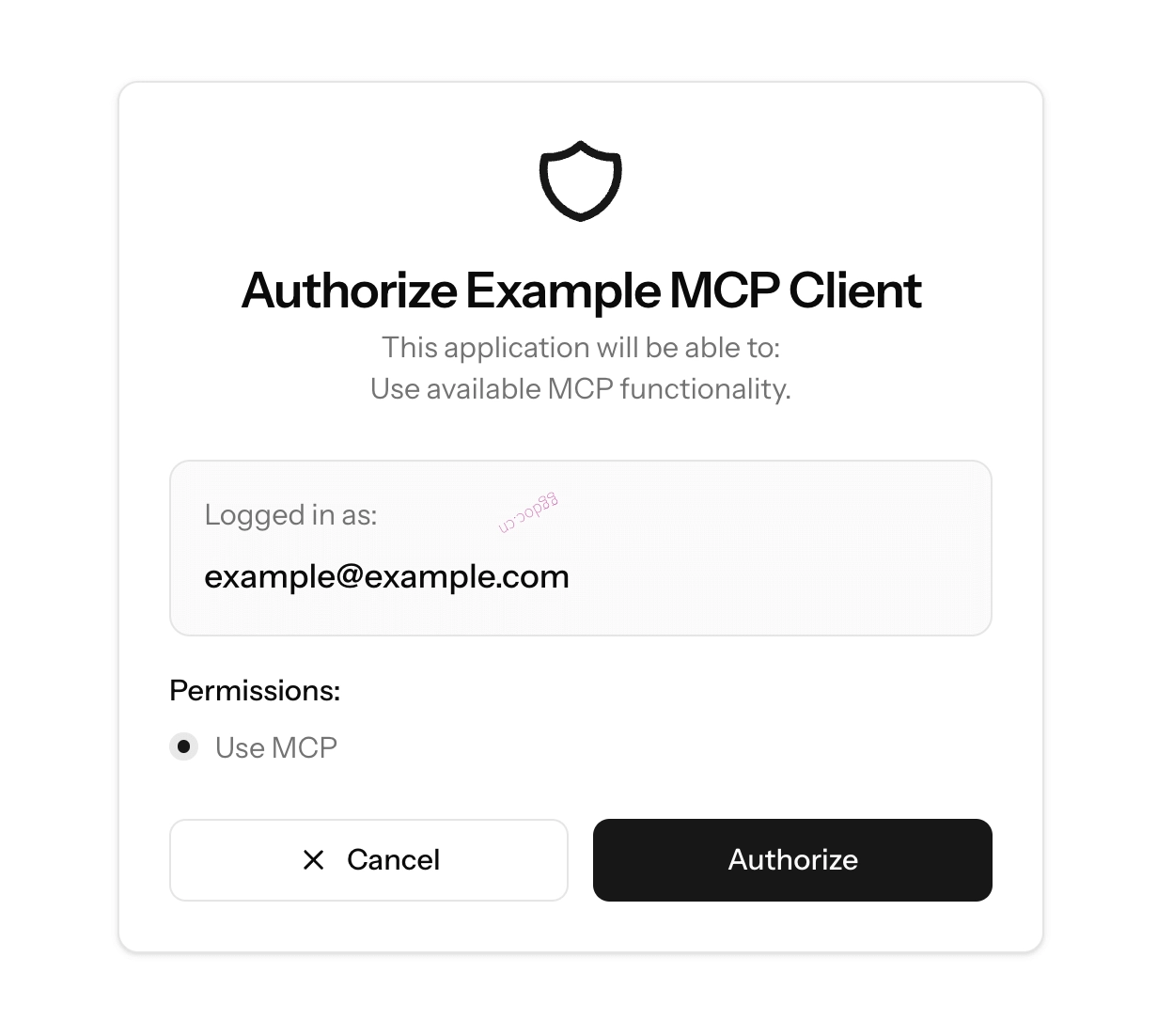
授权屏幕示例
在此场景中,我们仅将 OAuth 用作底层可认证模型的转换层。我们忽略了 OAuth 的许多方面,例如作用域。
使用现有的 Passport 安装
如果您的应用程序已经在使用 Laravel Passport,Laravel MCP 应该可以在您现有的 Passport 安装中无缝工作,但目前不支持自定义作用域,因为 OAuth 主要被用作底层可认证模型的转换层。
Laravel MCP 通过上述讨论的 Mcp::oauthRoutes 方法添加、声明并使用单个 mcp:use 作用域。
Passport 与 Sanctum
OAuth2.1 是 Model Context Protocol 规范中记录的认证机制,也是 MCP 客户端中最广泛支持的机制。因此,我们建议在可能的情况下使用 Passport。
如果您的应用已经在使用 Sanctum,那么添加 Passport 可能会比较繁琐。在这种情况下,我们建议在明确需要为仅支持 OAuth 的 MCP 客户端提供服务之前,先使用 Sanctum 而不要使用 Passport。
限制 OAuth 路由的速率
正如 MCP 规范和 RFC 7591 所预期的那样,由 Mcp::oauthRoutes 注册的动态客户端注册路由是公开可访问的,允许任何 MCP 客户端在不进行身份验证的情况下自行注册。由于每次注册都会在数据库中创建一个新的 OAuth 客户端,因此您应该使用符合应用程序流量的速率限制来保护这些路由。您可以通过将路由注册在应用了 Laravel throttle 中间件的路由组中来实现这一点:
use Illuminate\Support\Facades\Route;
use Laravel\Mcp\Facades\Mcp;

Route::middleware('throttle:10,1')->group(function () {
    Mcp::oauthRoutes();
});
如果您的 MCP 客户端不需要动态自行注册,您可以将 false 传递给 registration 参数以完全禁用客户端注册路由:
Mcp::oauthRoutes(registration: false);Sanctum
如果您希望使用 Sanctum 来保护您的 MCP 服务器,只需在 routes/ai.php 文件中将 Sanctum 的身份验证中间件添加到您的服务器即可。然后,确保您的 MCP 客户端提供 Authorization: Bearer <token> 标头以确保身份验证成功:
use App\Mcp\Servers\WeatherExample;
use Laravel\Mcp\Facades\Mcp;

Mcp::web('/mcp/demo', WeatherExample::class)
    ->middleware('auth:sanctum');
自定义 MCP 身份验证
如果您的应用颁发自己的自定义 API 令牌,您可以将任意中间件分配给 Mcp::web 路由来对您的 MCP 服务器进行身份验证。您的自定义中间件可以手动检查 Authorization 标头以对传入的 MCP 请求进行身份验证。
授权
您可以通过 $request->user() 方法访问当前已认证的用户,从而允许您在 MCP 工具和资源中进行 授权检查:
use Laravel\Mcp\Request;
use Laravel\Mcp\Response;

/**
 * 处理工具请求。
 */
public function handle(Request $request): Response
{
    if (! $request->user()->can('read-weather')) {
        return Response::error('Permission denied.');
    }

    // ...
}
MCP 客户端
除了构建服务器外,Laravel MCP 还包含一个用于连接其他 MCP 服务器的客户端,无论是第一方还是第三方。该客户端允许您的应用发现并调用 MCP 服务器提供的工具,这对于让您的 AI 代理 访问外部 MCP 服务器提供的功能特别有用。
例如,聊天应用可以使用每个用户的 GitHub 令牌连接到 GitHub 的 MCP 服务器,使其代理能够回答关于该用户仓库的问题。在此场景中,您的应用是 MCP 客户端;您无需创建 MCP 服务器或注册 Mcp::web 路由。
连接服务器
您可以使用 Client::web 方法连接到可通过 HTTP 访问的 MCP 服务器,并传递服务器的 URL:
use Laravel\Mcp\Client;

$client = Client::web('https://api.githubcopilot.com/mcp/');
要连接到作为命令运行的本地 MCP 服务器,请使用 Client::local 方法,并提供启动服务器所需的命令和任何参数:
use Laravel\Mcp\Client;

$client = Client::local('php', ['artisan', 'mcp:start']);
客户端采用延迟连接方式,在您首次列出或调用工具时自动建立连接。如果您需要手动管理连接,可以使用 connect、connected 和 disconnect 方法:
$client->connect();

if ($client->connected()) {
    $capabilities = $client->capabilities();
    $server = $client->serverInfo();
}

$client->disconnect();
您可以使用 withTimeout 方法自定义请求超时时间:
$client = Client::web('https://api.githubcopilot.com/mcp/')->withTimeout(30);命名客户端
与其每次需要时都构造一个新客户端,您还可以选择注册可重用的命名客户端。registerClient 方法为传出连接命名;它不暴露 MCP 服务器或授权用户。注册通常在服务提供者的 boot 方法中使用 Mcp facade 完成:
use Laravel\Mcp\Client;
use Laravel\Mcp\Facades\Mcp;

Mcp::registerClient('github', fn () => Client::web('https://api.githubcopilot.com/mcp/'));
注册后,您可以在应用中的任何位置通过名称解析客户端:
use Laravel\Mcp\Facades\Mcp;

$client = Mcp::client('github');
命名客户端在每个请求中只解析一次,并在请求生命周期结束时自动断开连接。
客户端身份验证
Bearer 令牌
要连接到受 Bearer 令牌保护的 Web MCP 服务器,请使用 withToken 方法。您可以传递令牌字符串或使用闭包来惰性解析令牌:
use Illuminate\Support\Facades\Auth;
use Laravel\Mcp\Client;

$client = Client::web('https://api.githubcopilot.com/mcp/')->withToken(
    config('services.github_mcp.token'),
);

$client = Client::web('https://api.githubcopilot.com/mcp/')->withToken(
    fn () => Auth::user()->github_mcp_token,
);
如果您已通过 Socialite 或其他账户关联流程获得了合适的令牌,请将该令牌传递给 withToken;您无需注册 MCP OAuth 路由。
使用 OAuth 关联用户账户
设想一个聊天应用程序,其中用户连接了一个项目管理服务,然后向代理提问,例如“我有哪些任务已逾期?”。外部项目管理服务暴露了一个受 OAuth 保护的 MCP 服务器。您的应用程序必须将每个用户重定向到该服务的同意屏幕,将其批准交换为令牌,并存储该令牌以供未来的工具调用。
Laravel MCP 使用 withOAuth 和 Mcp::oAuthRoutesFor 处理此账户关联流程。首先,在服务提供者中注册一个命名客户端。OAuth 客户端凭据用于向服务标识您的应用程序,而 withToken 则在调用工具时提供已连接用户的保存访问令牌:
use Illuminate\Support\Facades\Auth;
use Laravel\Mcp\Client;
use Laravel\Mcp\Facades\Mcp;

Mcp::registerClient('projects', fn () => Client::web('https://projects.example.com/mcp')
    ->withOAuth(
        clientId: config('services.projects.client_id'),
        clientSecret: config('services.projects.client_secret'),
    )
    ->withToken(fn () => Auth::user()->projects_token));
clientId 和 clientSecret 参数可以省略。如果授权服务器支持它们,Laravel 将使用 客户端 ID 元数据文档;对于遗留服务器,则回退到 动态客户端注册。
授权服务器必须在授权服务器元数据中声明支持 S256 PKCE 代码挑战方法。如果未声明支持 PKCE,Laravel 将拒绝授权尝试。
接下来,在您的 routes/ai.php 文件中注册账户关联路由。回调函数接收客户端名称和生成的 TokenSet,允许您将令牌保存给当前登录的用户:
use Illuminate\Support\Facades\Auth;
use Laravel\Mcp\Client\OAuth\TokenSet;
use Laravel\Mcp\Facades\Mcp;

Mcp::oAuthRoutesFor('projects', function (string $client, TokenSet $token) {
    Auth::user()->update([
        'projects_token' => $token->accessToken,
    ]);

    return redirect('/chat');
}, middleware: ['web', 'auth']);
oAuthRoutesFor 方法注册三个命名路由:连接路由(mcp.oauth.{client}.connect),它将用户重定向到授权服务器;回调路由(mcp.oauth.{client}.callback),它交换授权码并调用您的处理器;以及公开的客户端 ID 元数据文档路由(mcp.oauth.{client}.client-metadata)。
连接和回调路由默认使用 web 中间件组;上面的账户关联示例添加了 auth 以要求用户已登录。元数据路由不使用此中间件,因为授权服务器必须能够检索它。
您的“连接项目服务”按钮应将用户发送到连接路由:
return redirect()->route('mcp.oauth.projects.connect');Laravel 将用户重定向到服务以批准访问,在他们返回时交换授权码,并调用您的回调函数。在随后的聊天请求中,命名客户端使用保存的令牌。例如,一个 AI SDK 代理 可能会暴露该服务的工具:
public function tools(): iterable
{
    return [
        ...Mcp::client('projects')->tools(),
    ];
}
使用 加密转换 存储令牌,并从模型序列化中隐藏它们。如果服务颁发过期的令牌,还应从 TokenSet 中持久化刷新令牌和过期信息,并在进行工具调用之前处理续期。对于队列中的代理,应从显式提供的用户解析凭据,而不是使用 Auth::user()。
Mcp::oAuthRoutesFor 将您的用户连接到外部服务。相比之下,Mcp::oauthRoutes 允许外部 AI 客户端使用 Passport 认证到您的自己的 MCP 服务器。对于上述账户关联流程,您不需要 Passport 或 Mcp::oauthRoutes。
客户端元数据
元数据文档将您的应用程序描述为公共 OAuth 客户端,并使用您应用程序的 APP_URL 生成客户端 ID 和回调 URL。因此,您应确保在生产环境中正确设置了 APP_URL 环境变量。您可以自定义元数据路由,并使用 clientMetadataUri 和 clientMetadata 参数提供其他元数据:
use Laravel\Mcp\Client\OAuth\TokenSet;
use Laravel\Mcp\Facades\Mcp;

Mcp::oAuthRoutesFor(
    'projects',
    function (string $client, TokenSet $token) {
        // Store the token...

        return redirect('/dashboard');
    },
    clientMetadataUri: 'oauth/projects/client.json',
    clientMetadata: [
        'client_name' => 'Acme Dashboard',
        'logo_uri' => 'https://acme.com/logo.png',
    ],
);
工具
您可以使用 tools 方法获取 MCP 服务器暴露的工具,该方法返回一个以名称为键的工具集合:
use Laravel\Mcp\Facades\Mcp;

$tools = Mcp::client('github')->tools();

foreach ($tools as $tool) {
    $tool->name;
    $tool->title;
    $tool->description;
    $tool->inputSchema;
}
客户端会自动分页遍历所有可用工具。您可以使用 limit 参数限制返回的工具数量:
$tools = Mcp::client('github')->tools(limit: 10);要调用工具,请使用 callTool 方法,传入工具名称和参数字典数组。返回的 ToolResult 实例可访问工具响应:
use Laravel\Mcp\Facades\Mcp;

$result = Mcp::client('github')->callTool('list_issues', [
    'owner' => 'laravel',
    'repo' => 'framework',
]);

$result->text(); // 响应的文本内容...
(string) $result; // 等同于调用 text()...
$result->isError; // 工具是否报告了错误...
$result->structuredContent;  // 结构化内容(如果有)...
或者,您也可以直接从列出的工具实例中调用工具:
$tools = Mcp::client('github')->tools();

$result = $tools['list_issues']->call([
    'owner' => 'laravel',
    'repo' => 'framework',
]);
如果您正在使用 Laravel AI SDK 构建代理,也可以直接将 MCP 客户端提供的工具提供给代理,使模型能够在响应提示时调用这些工具。有关更多信息,请参阅 AI SDK 文档中的 MCP 工具 部分。
提示
您可以使用 prompts 方法获取 MCP 服务器暴露的提示,该方法返回一个以名称为键的提示集合:
use Laravel\Mcp\Facades\Mcp;

$prompts = Mcp::client('github')->prompts();

foreach ($prompts as $prompt) {
    $prompt->name;
    $prompt->title;
    $prompt->description;
    $prompt->arguments;
}
客户端会自动分页遍历所有可用提示。您可以使用 limit 参数限制返回的提示数量:
$prompts = Mcp::client('github')->prompts(limit: 10);要获取提示,请使用 getPrompt 方法,传入提示名称和参数字典数组。返回的 PromptResult 实例可访问生成的消息:
use Laravel\Mcp\Facades\Mcp;

$result = Mcp::client('github')->getPrompt('issue_to_fix_workflow', [
    'owner' => 'laravel',
    'repo' => 'framework',
    'title' => 'Fix typo in README',
    'description' => 'The installation section has a typo.',
]);

$result->text(); // 消息的文本内容...
(string) $result; // 等同于调用 text()...
$result->messages; // 提示返回的原始消息...
$result->description; // 提示描述(如果有)...
资源
您可以使用 resources 方法获取 MCP 服务器暴露的资源,该方法返回一个以 URI 为键的资源集合:
use Laravel\Mcp\Facades\Mcp;

$resources = Mcp::client('github')->resources();

foreach ($resources as $resource) {
    $resource->uri;
    $resource->name;
    $resource->title;
    $resource->description;
    $resource->mimeType;
    $resource->size;
}
客户端会自动分页遍历所有可用资源。您可以使用 limit 参数限制返回的资源数量:
$resources = Mcp::client('github')->resources(limit: 10);要读取资源,请使用 readResource 方法,传入资源 URI。返回的 ResourceReadResult 实例可访问资源内容:
use Laravel\Mcp\Facades\Mcp;

$result = Mcp::client('github')->readResource('repo://laravel/framework/contents/README.md');

$result->content(); // 资源内容,根据需要解码 base64 块...
(string) $result; // 等同于调用 content()...
$result->mimeType(); // 资源的 MIME 类型(如果有)...
$result->contents; // 资源返回的原始内容...
测试服务器
您可以使用内置的 MCP Inspector 或编写单元测试来测试您的 MCP 服务器。
MCP Inspector
MCP Inspector 是一个用于测试和调试 MCP 服务器的交互式工具。使用它连接到您的服务器、验证身份认证并尝试工具、资源和提示。
您可以为任何已注册的服务器运行 Inspector:
# Web 服务器...
php artisan mcp:inspector mcp/weather

# 名为 "weather" 的本地服务器...
php artisan mcp:inspector weather
此命令启动 MCP Inspector 并提供客户端设置,您可以将其复制到您的 MCP 客户端中,以确保所有配置正确。如果您的 Web 服务器受到身份验证中间件保护,请在连接时确保包含所需的标头,例如 Authorization bearer 令牌。
单元测试
您可以为您的 MCP 服务器、工具、资源和提示编写单元测试。
要开始使用,请创建一个新的测试用例并调用注册它的服务器上的所需原语。例如,要测试 WeatherServer 上的工具:
test('tool', function () {
    $response = WeatherServer::tool(CurrentWeatherTool::class, [
        'location' => 'New York City',
        'units' => 'fahrenheit',
    ]);

    $response
        ->assertOk()
        ->assertSee('The current weather in New York City is 72°F and sunny.');
});
/**
* 测试一个工具。
*/
public function test_tool(): void
{
$response = WeatherServer::tool(CurrentWeatherTool::class, [
'location' => 'New York City',
'units' => 'fahrenheit',
]);
$response
->assertOk()
->assertSee('The current weather in New York City is 72°F and sunny.');
}类似地,您可以测试提示和资源:
$response = WeatherServer::prompt(...);
$response = WeatherServer::resource(...);
您还可以在调用原语之前链式调用 actingAs 方法以模拟已认证用户:
$response = WeatherServer::actingAs($user)->tool(...);一旦收到响应,您就可以使用各种断言方法来验证响应的内容和状态。
您可以使用 assertOk 方法断言响应是否成功。这检查响应是否没有任何错误:
$response->assertOk();您可以使用 assertSee 方法断言响应是否包含特定文本:
$response->assertSee('The current weather in New York City is 72°F and sunny.');您可以使用 assertHasErrors 方法断言响应是否包含错误:
$response->assertHasErrors();

$response->assertHasErrors([
    'Something went wrong.',
]);
您可以使用 assertHasNoErrors 方法断言响应是否不包含错误:
$response->assertHasNoErrors();您可以使用 assertName()、assertTitle() 和 assertDescription() 方法断言响应是否包含特定的元数据:
$response->assertName('current-weather');
$response->assertTitle('Current Weather Tool');
$response->assertDescription('Fetches the current weather forecast for a specified location.');
您可以使用 assertSentNotification 和 assertNotificationCount 方法断言是否发送了通知:
$response->assertSentNotification('processing/progress', [
    'step' => 1,
    'total' => 5,
]);

$response->assertSentNotification('processing/progress', [
    'step' => 2,
    'total' => 5,
]);

$response->assertNotificationCount(5);
最后,如果您希望检查原始响应内容,可以使用 dd 或 dump 方法输出响应以进行调试:
$response->dd();
$response->dump();