于 WordPress 版本 2.7 引入,仪表盘小工具 API 使得向 管理仪表盘 添加新的小工具变得简单。
实现这一点需要掌握 PHP 和 WordPress 插件 API 的相关知识,但对于熟悉钩子(actions 和 filters)的插件或主题作者来说,仅需几分钟即可完成,是让你的插件更有用的绝佳方式。
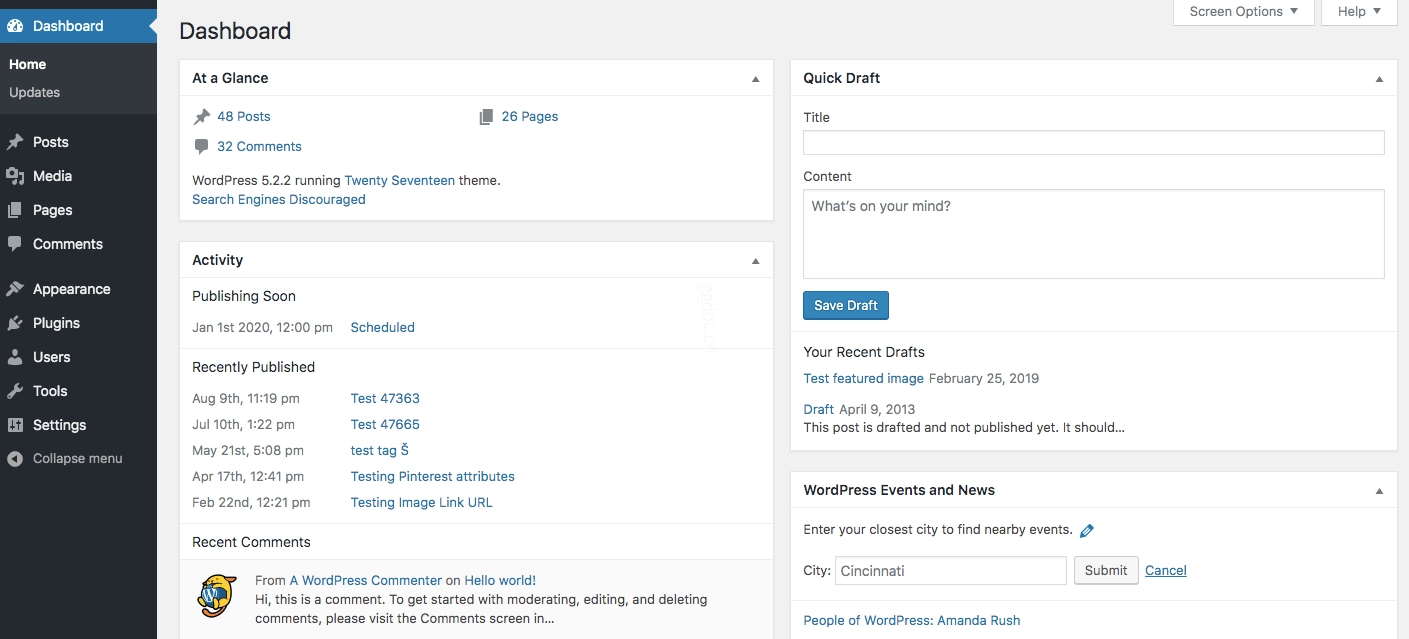
概述
主要函数
添加仪表盘小工具所需的主要工具是 wp_add_dashboard_widget() 函数。你可以在该链接中找到此函数的完整描述,但下面给出了简要概述。
用法
wp_add_dashboard_widget( $widget_id, $widget_name, $callback, $control_callback, $callback_args );$widget_id: 用于标识你小工具的 slug。它将用作其 CSS 类名以及小工具数组中的键。$widget_name: 这是你的小工具在标题中显示的名称。$callback: 你将创建的一个函数名,用于显示小工具的实际内容。$control_callback(可选): 你将创建的一个函数名,用于处理小工具选项表单的提交,并显示表单元素。$callback_args(可选): 回调函数的参数集。
动作钩子
要运行该函数,你需要通过 add_action() 挂钩到动作 wp_dashboard_setup。对于网络管理仪表盘,请使用钩子 wp_network_dashboard_setup。
/**
 * Add a widget to the dashboard.
 *
 * This function is hooked into the 'wp_dashboard_setup' action below.
 */
function wporg_add_dashboard_widgets() {
	// Add function here
}
add_action( 'wp_dashboard_setup', 'wporg_add_dashboard_widgets' );
网络仪表盘:
/**
 * Add a widget to the network dashboard.
 *
 * This function is hooked into the 'wp_network_dashboard_setup' action below.
 */
function wporg_add_network_dashboard_widgets() {
	// Add function here
}
add_action( 'wp_network_dashboard_setup', 'wporg_add_network_dashboard_widgets' );
示例
基本用法
/**
 * Add a widget to the dashboard.
 *
 * This function is hooked into the 'wp_dashboard_setup' action below.
 */
function wporg_add_dashboard_widgets() {
	wp_add_dashboard_widget(
		'wporg_dashboard_widget',                          // Widget slug.
		esc_html__( 'Example Dashboard Widget', 'wporg' ), // Title.
		'wporg_dashboard_widget_render'                    // Display function.
	);
}
add_action( 'wp_dashboard_setup', 'wporg_add_dashboard_widgets' );

/**
 * Create the function to output the content of our Dashboard Widget.
 */
function wporg_dashboard_widget_render() {
	// Display whatever you want to show.
	esc_html_e( "Howdy! I'm a great Dashboard Widget.", "wporg" );
}
强制将小工具置于顶部
通常,你应该让插件用户通过拖动将他们的小工具放在任意位置。目前还没有简单的 API 方法来预排序默认小工具,这意味着你的新小工具将始终位于列表底部。在 API 添加排序功能之前,解决此问题有点复杂。
下面是一个挂钩函数的示例,它尝试将你的小工具放在默认小工具之前。它是通过手动更改 metaboxes 的内部数组(仪表盘小工具是其中一种类型)并将你的小工具放在列表顶部来实现的,以便首先显示。
function wporg_add_dashboard_widgets() {
	wp_add_dashboard_widget(
		'wporg_dashboard_widget',
		esc_html__( 'Example Dashboard Widget', 'wporg' ),
		'wporg_dashboard_widget_function'
	);

	// Globalize the metaboxes array, this holds all the widgets for wp-admin.
	global $wp_meta_boxes;

	// Get the regular dashboard widgets array
	// (which already has our new widget but appended at the end).
	$default_dashboard = $wp_meta_boxes['dashboard']['normal']['core'];

	// Backup and delete our new dashboard widget from the end of the array.
	$example_widget_backup = array( 'example_dashboard_widget' => $default_dashboard['example_dashboard_widget'] );
	unset( $default_dashboard['example_dashboard_widget'] );

	// Merge the two arrays together so our widget is at the beginning.
	$sorted_dashboard = array_merge( $example_widget_backup, $default_dashboard );

	// Save the sorted array back into the original metaboxes.
	$wp_meta_boxes['dashboard']['normal']['core'] = $sorted_dashboard;
}
add_action( 'wp_dashboard_setup', 'wporg_add_dashboard_widgets' );
不幸的是,这仅适用于从未重新排列过小工具的用户。一旦用户这样做了,他们的现有偏好设置将覆盖此设置,他们必须将你的小工具移动到顶部才能使其停留在那里。
移除默认仪表盘小工具
在某些情况下,特别是在多用户博客上,完全从界面中移除小工具可能是有用的。每个单独的用户默认都可以通过顶部的 屏幕选项 标签关闭任何给定小工具,但如果有很多非技术用户,可能最好让他们根本看不到它。
要移除仪表盘小工具,请使用 remove_meta_box() 函数。请参阅下面的示例代码以了解所需的参数。
以下是仪表盘中默认小工具的名称:
// Main column (left):
// Browser Update Required
$wp_meta_boxes['dashboard']['normal']['high']['dashboard_browser_nag'];
// PHP Update Required
$wp_meta_boxes['dashboard']['normal']['high']['dashboard_php_nag'];

// At a Glance
$wp_meta_boxes['dashboard']['normal']['core']['dashboard_right_now'];
// Right Now
$wp_meta_boxes['dashboard']['normal']['core']['network_dashboard_right_now'];
// Activity
$wp_meta_boxes['dashboard']['normal']['core']['dashboard_activity'];
// Site Health Status
$wp_meta_boxes['dashboard']['normal']['core']['dashboard_site_health'];

// Side Column (right):
// WordPress Events and News
$wp_meta_boxes['dashboard']['side']['core']['dashboard_primary'];
// Quick Draft, Your Recent Drafts
$wp_meta_boxes['dashboard']['side']['core']['dashboard_quick_press'];
这是一个移除 QuickPress 小工具的示例函数:
// Create the function to use in the action hook
function wporg_remove_dashboard_widget() {
	remove_meta_box( 'dashboard_quick_press', 'dashboard', 'side' );
}
// Hook into the 'wp_dashboard_setup' action to register our function
add_action( 'wp_dashboard_setup', 'wporg_remove_dashboard_widget' );
下面的示例移除了所有仪表盘小工具:
function wporg_remove_all_dashboard_metaboxes() {
	// Remove Welcome panel
	remove_action( 'welcome_panel', 'wp_welcome_panel' );
	// Remove the rest of the dashboard widgets
	remove_meta_box( 'dashboard_primary', 'dashboard', 'side' );
	remove_meta_box( 'dashboard_quick_press', 'dashboard', 'side' );
	remove_meta_box( 'dashboard_site_health', 'dashboard', 'normal' );
	remove_meta_box( 'dashboard_right_now', 'dashboard', 'normal' );
	remove_meta_box( 'dashboard_activity', 'dashboard', 'normal');
}
add_action( 'wp_dashboard_setup', 'wporg_remove_all_dashboard_metaboxes' );
在右侧添加小工具
该函数不允许你选择小工具放置的位置,会自动将其添加到“core"(即左侧)。不过,你可以很容易地将其放到右侧。
你可以使用 add_meta_box() 函数代替 wp_add_dashboard_widget。只需将 'dashboard' 指定为 $post_type 即可。例如:
add_meta_box(
	'dashboard_widget_id',
	esc_html__( 'Dashboard Widget Title', 'wporg' ),
	'dashboard_widget',
	'dashboard',
	'side', 'high'
);
或者,在创建小工具之后:
function wporg_add_dashboard_widget() {
	wp_add_dashboard_widget(
		'wporg_dashboard_widget',
		esc_html__( 'Example Dashboard Widget', 'wporg' ),
		'wporg_dashboard_widget_function'
	);

	// Global the $wp_meta_boxes variable (this will allow us to alter the array).
	global $wp_meta_boxes;

	// Then we make a backup of your widget.
	$wporg_widget = $wp_meta_boxes['dashboard']['normal']['core']['wporg_dashboard_widget'];

	// We then unset that part of the array.
	unset( $wp_meta_boxes['dashboard']['normal']['core']['wporg_dashboard_widget'] );

	// Now we just add your widget back in.
	$wp_meta_boxes['dashboard']['side']['core']['wporg_dashboard_widget'] = $wporg_widget;
}
add_action( 'wp_dashboard_setup', 'wporg_add_dashboard_widget' );
在仪表板中聚合 RSS 源
如果您需要在小部件中聚合 RSS,请查看现有插件如何使用缓存,参考:/wp-admin/includes/dashboard.php。
小部件选项
WordPress 未提供获取特定小部件选项的内置方法。默认情况下,您需要使用get_option( 'dashboard_widget_options' )获取所有小部件选项,然后手动过滤返回的数组。本节介绍了一些可以轻松添加到主题或插件中的函数,以协助获取和设置小部件选项。
获取小部件选项
此函数将获取所有小部件选项,或仅获取指定小部件的选项:
/**
 * Gets all widget options, or only options for a specified widget if a widget id is provided.
 *
 * @param string $widget_id Optional. If provided, will only get options for that widget.
 * @return array An associative array
 */
function wporg_get_dashboard_widget_options( $widget_id = '' ) {
    // Fetch ALL dashboard widget options from the db
    $options = get_option( 'dashboard_widget_options' );

    // If no widget is specified, return everything
    if ( empty( $widget_id ) ) {
        return $options;
    }

    // If we request a widget and it exists, return it
    if ( isset( $options[$widget_id] ) ) {
        return $options[$widget_id];
    }

    // Something went wrong...
    return false;
}
获取单个小部件选项
如果您想轻松获取单个选项(用于输出到主题),以下函数将使该操作更加简便。
此示例应与前面的获取小部件选项示例函数配合使用。
/**
 * Gets one specific option for the specified widget.
 *
 * @param  string $widget_id Widget ID.
 * @param  string $option    Widget option.
 * @param  string $default   Default option.
 *
 * @return string            Returns single widget option.
 */
function wporg_get_dashboard_widget_option( $widget_id, $option, $default = NULL ) {
	$options = wporg_get_dashboard_widget_options( $widget_id );

	// If widget options don't exist, return false.
	if ( ! $options ) {
		return false;
	}

	// Otherwise fetch the option or use default
	if ( isset( $options[$option] ) && ! empty( $options[$option] ) ) {
		return $options[$option];
	} else {
		return ( isset( $default ) ) ? $default : false;
	}
}
更新小部件选项
此函数可用于轻松更新小部件的所有选项。它也可用于非破坏性地添加小部件选项。只需将$add_option参数设置为true,这将不会覆盖任何现有选项(尽管会添加任何缺失的选项)。
/**
 * Saves an array of options for a single dashboard widget to the database.
 * Can also be used to define default values for a widget.
 *
 * @param string $widget_id  The name of the widget being updated
 * @param array $args        An associative array of options being saved.
 * @param bool $add_only     Set to true if you don't want to override any existing options.
 */
function update_dashboard_widget_options( $widget_id , $args = array(), $add_only = false ) {
	// Fetch ALL dashboard widget options from the db...
	$options = get_option( 'dashboard_widget_options' );

	// Get just our widget's options, or set empty array.
	$widget_options = ( isset( $options[$widget_id] ) ) ? $options[$widget_id] : array();

	if ( $add_only ) {
		// Flesh out any missing options (existing ones overwrite new ones).
		$options[$widget_id] = array_merge( $args, $widget_options );
	} else {
		// Merge new options with existing ones, and add it back to the widgets array.
		$options[$widget_id] = array_merge( $widget_options, $args );
	}

	// Save the entire widgets array back to the db.
	return update_option( 'dashboard_widget_options', $options );
}