本指南将带你从全新的 安装 开始,直至在终端或通过 Web UI 与模型进行对话。
下载你的第一个模型
Llama app
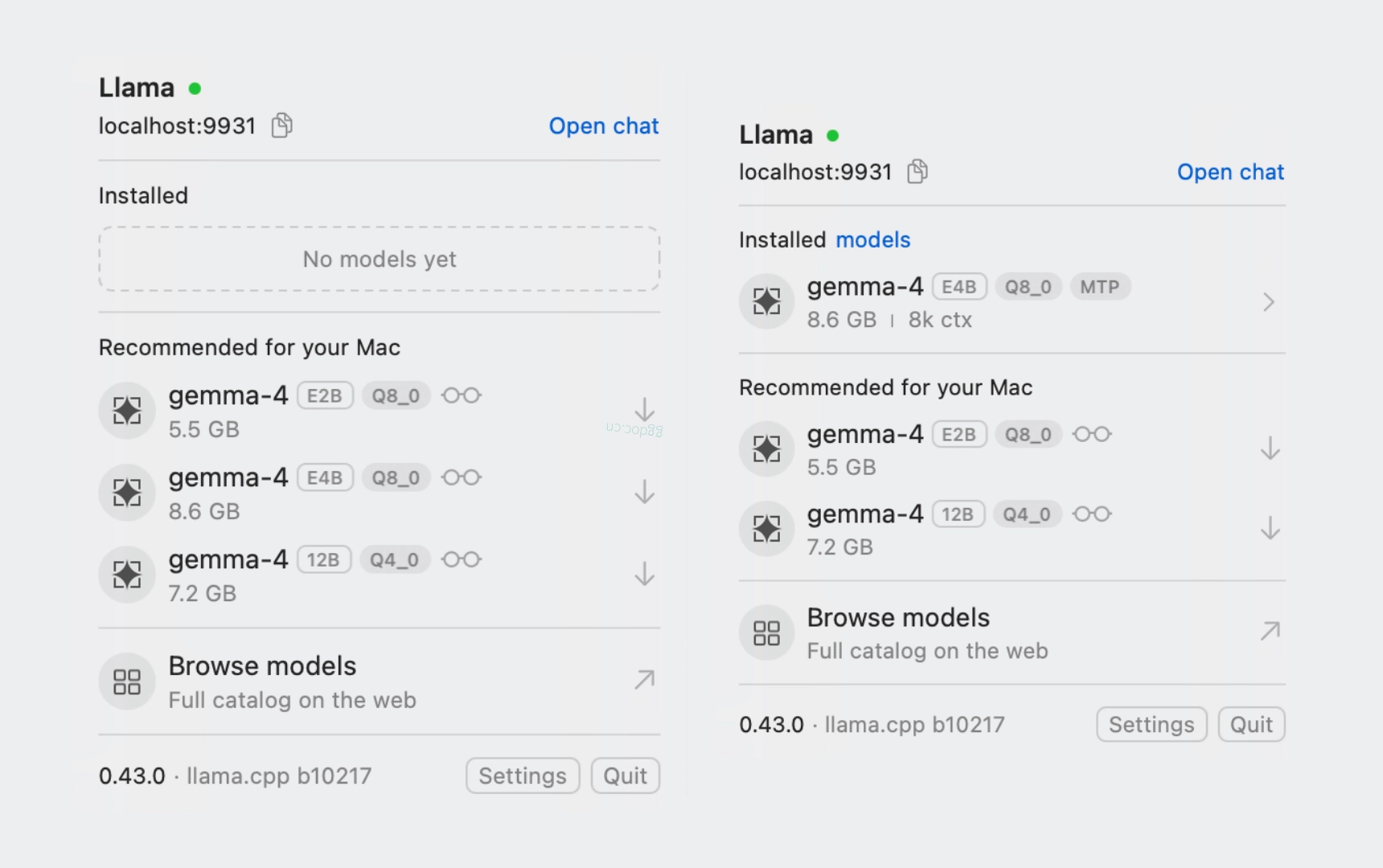
在 Llama app 中,点击适用于你平台的推荐模型旁边的向下箭头。
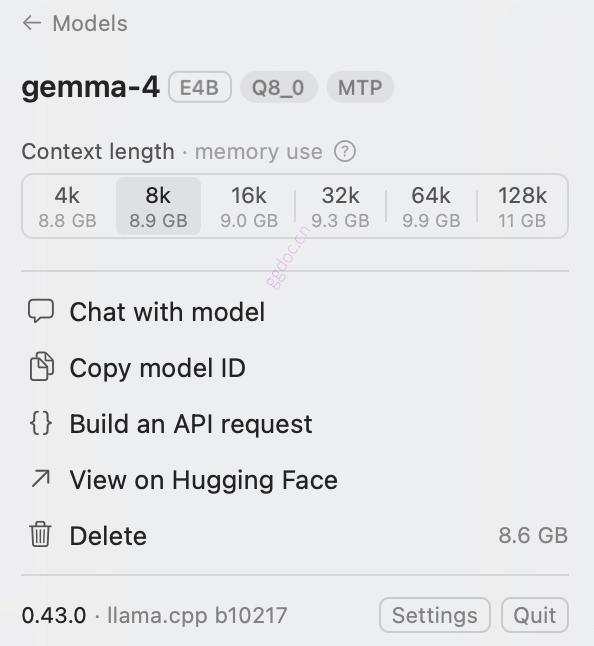
 下载完成后,你可以点击该模型以打开聊天选项。根据你的内存大小和想要进行的对话长度,选择上下文窗口 > 与模型聊天。
Llama CLI
如果你想使用 CLI 与模型聊天,请通过 -hf 标志传递一个 Hugging Face 仓库。首次使用时会自动下载模型:
llama cli -hf unsloth/gemma-4-E4B-it-GGUF:Q4_K_M
我们选择了 Gemma-4 E4B 的 4-bit 量化版本,这是一个可以接收图像、文本和音频输入的模型,在拥有 16k token 上下文窗口的情况下仅占用约 6GB 内存。Hugging Face 上有数千个 GGUF 模型供你选择。
下载的模型存储在标准的 Hugging Face 缓存中,因此它们可与其他工具共享。使用 llama cli -cl 列出缓存中的内容。
如果你磁盘上已有 .gguf 文件,请使用 -m 指向文件路径:
llama cli -m my-model.gguf
在终端中聊天
运行带有模型的 llama cli 可直接进入交互式聊天:
> hello, who are you?

[Start thinking]
*   Analyze the user request: The user is asking for my identity ("hello, who are you?").
    *   Core instruction check: I must identify myself as Gemma 4, developed by Google DeepMind, an open-weights LLM.
*   Formulate the response based on the instructions and provided persona.

    *   Name: Gemma 4.
    *   Developer: Google DeepMind.
    *   Nature: Large Language Model (LLM).
    *   Type: Open weights model.
*   Draft the response: "Hello! I am Gemma 4, an open weights large language model developed by Google DeepMind."
[End thinking]

Hello! I am Gemma 4, an open weights large language model developed by Google DeepMind. How can I help you today?

[ Prompt: 113.2 t/s | Generation: 36.1 t/s ]
有关系统提示词、采样设置、多模态输入等更多信息,请参阅 使用 CLI。
服务化模型
llama serve 启动服务器并通过 HTTP 暴露模型。它附带一个功能齐全的聊天 UI。
llama serve -hf ggml-org/gemma-4-e4b-it-GGUF:Q4_0
然后在浏览器中打开 http://localhost:9931 以使用 内置 Web UI,或调用 API:
curl http://localhost:9931/v1/chat/completions \
    -H "Content-Type: application/json" \
    -d '{
        "messages": [
            {"role": "user", "content": "Give me a baklava recipe."}
        ]
    }'
由于该 API 兼容 OpenAI 端点,你可以将其接入许多不同的客户端和框架。
import openai

client = openai.OpenAI(base_url="http://localhost:9931/v1", api_key="no-key-required")

response = client.chat.completions.create(
    model="gemma-4-e4b-it",
    messages=[{"role": "user", "content": "Hello!"}],
)
print(response.choices[0].message.content)
常用选项
以下是你可以在 llama cli 和 llama serve 中使用的一些实用标志:
| Flag | 作用 |
|---|---|
-c, --ctx-size N | 上下文窗口大小(token 数)(0 = 使用模型的原生最大值) |
-sys "..." | 设置系统提示词(CLI) |
默认情况下,llama.cpp 会自动调整未设置的选项以适配你的设备内存。
下一步
- 使用 CLI Llama CLI 的高级用法
- 运行服务器 服务器配置、路由等
- Web UI 使用并自定义便捷的聊天界面
- API server 包含示例的完整 API 参考