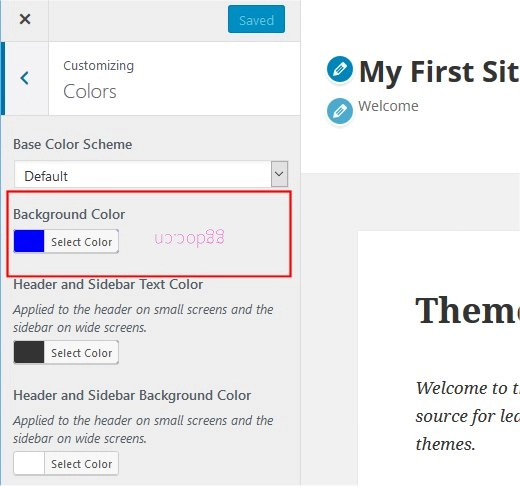
自定义背景是主题的一项功能,用于定制背景和图像。
主题开发者需要 2 个步骤来实现它。
- 启用自定义背景 – add_theme_support()
- 显示自定义背景 – wp_head() 和 body_class()
启用自定义背景
在 functions.php 文件中调用 add_theme_support() 来启用自定义背景。
add_theme_support( 'custom-background' );
您可以指定默认参数。在下例中,使用默认的 '#0000ff'(蓝色)背景和存储在 /images 文件夹下的 'wapuu.jpg' 背景图像。
$args = array(
    'default-color' => '0000ff',
    'default-image' => get_template_directory_uri() . '/images/wapuu.jpg',
);
add_theme_support( 'custom-background', $args );
通过调用 add_theme_support() ,自定义程序器将在颜色菜单中显示“背景图像”菜单和“背景颜色”部分。
显示自定义背景
通常,在 header.php 文件中调用 wp_head() 和 body_class() 来显示自定义背景。
<!DOCTYPE html>
<html>
<head>
    <?php wp_head(); ?>
</head>
<body <?php body_class(); ?>>
wp_head() 在 HTML 标题中生成额外的内联样式表,通常位于文档 HEAD 元素的末尾之前。该额外样式表会覆盖主题样式表中的背景值。
在我们的示例中,以下代码将在 HTML 中生成。请注意 body 标签包含“custom-background”类。
<!DOCTYPE html>
<html lang="en-US" class="no-js">

<head>
	...
<style type="text/css" id="custom-background-css">
body.custom-background {
  background-image: url("http://example.com/wordpress/wp-content/themes/my-first-theme/images/wapuu.jpg");
  background-position: left top;
  background-size: auto;
  background-repeat: repeat;
  background-attachment: scroll;
}
</style>
	...
</head>

<body class="home page-template-default page page-id-211 logged-in admin-bar no-customize-support custom-background">

	...
现在您将看到重复的背景图像

另一个默认示例
这是设置默认值的另一个示例。
$another_args = array(
    'default-color'      => '0000ff',
    'default-image'      => get_template_directory_uri() . '/images/wapuu.jpg',
    'default-position-x' => 'right',
    'default-position-y' => 'top',
    'default-repeat'     => 'no-repeat',
);
add_theme_support( 'custom-background', $another_args );
这将显示单张图像在右上角,如下所示。