WordPress 会根据您 WordPress 主题中 comments.php 文件内的设置和代码在您的主题中显示评论。
简单的评论循环
// Get only the approved comments
$args = array(
	'status' => 'approve',
);

// The comment Query
$comments_query = new WP_Comment_Query();
$comments       = $comments_query->query( $args );

// Comment Loop
if ( $comments ) {
	foreach ( $comments as $comment ) {
		echo '<p>' . $comment->comment_content . '</p>';
	}
} else {
	echo 'No comments found.';
}
comments.php 模板包含从数据库中提取评论并在您的主题中显示它们所需的所有逻辑。
在探索模板文件之前,您应该了解如何在适当的页面(例如 single.php)上引入部分模板文件。您将把评论 模板标签 包装在条件语句中,以便仅在有意义时才引入 comments.php。
// If comments are open or we have at least one comment, load up the comment template.
if ( comments_open() || get_comments_number() ) :
	comments_template();
endif;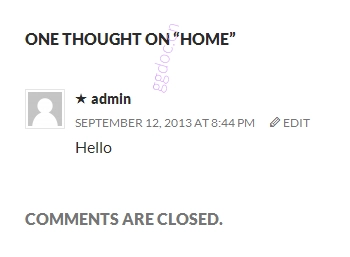
另一个 comments.php 示例
这是 Twenty Thirteen 主题中包含的 comments.php 模板的一个示例:
<?php
/**
 * The template for displaying Comments.
 *
 * The area of the page that contains comments and the comment form.
 *
 * @package WordPress
 * @subpackage Twenty_Thirteen
 * @since Twenty Thirteen 1.0
 */
/*
* If the current post is protected by a password and the visitor has not yet
* entered the password we will return early without loading the comments.
*/
if ( post_password_required() ) {
return;
}
?>
<div id="comments" class="comments-area">
<?php if ( have_comments() ) : ?>
<h2 class="comments-title">
<?php
printf(
_nx(
'One thought on "%2$s"',
'%1$s thoughts on "%2$s"',
get_comments_number(),
'comments title',
'twentythirteen'
),
number_format_i18n( get_comments_number() ),
'<span>' . get_the_title() . '</span>'
);
?>
</h2>
<ol class="comment-list">
<?php
wp_list_comments( array(
'style' => 'ol',
'short_ping' => true,
'avatar_size' => 74,
) );
?>
</ol><!-- .comment-list -->
<?php if ( get_comment_pages_count() > 1 && get_option( 'page_comments' ) ) : ?>
<nav class="navigation comment-navigation" role="navigation">
<h1 class="screen-reader-text section-heading"><?php _e( 'Comment navigation', 'twentythirteen' ); ?></h1>
<div class="nav-previous"><?php previous_comments_link( __( '← Older Comments', 'twentythirteen' ) ); ?></div>
<div class="nav-next"><?php next_comments_link( __( 'Newer Comments →', 'twentythirteen' ) ); ?></div>
</nav><!-- .comment-navigation -->
<?php endif; // Check for comment navigation ?>
<?php if ( ! comments_open() && get_comments_number() ) : ?>
<p class="no-comments"><?php _e( 'Comments are closed.', 'twentythirteen' ); ?></p>
<?php endif; ?>
<?php endif; // have_comments() ?>
<?php comment_form(); ?>
</div><!-- #comments -->
分解 comments.php
为了更好地理解,可以将上面的 comments.php 分解为以下部分。
- 模板头部
- 评论标题
- 评论列表
- 评论分页
- 评论已关闭消息。
- 结束
模板头部
此模板首先识别模板。
<?php
/**
* The template for displaying Comments.
*
* The area of the page that contains comments and the comment form.
*
* @package WordPress
* @subpackage Twenty_Thirteen
* @since Twenty Thirteen 1.0
*/接下来,有一个测试来查看帖子是否受密码保护,如果是,则停止处理模板。
/*
 * If the current post is protected by a password and the visitor has not yet
 * entered the password we will return early without loading the comments.
 */
if ( post_password_required() )
 return;
?>
最后,有一个测试来查看此帖子是否有关联的评论。
<div id="comments" class="comments-area">
	<?php if ( have_comments() ) : ?>
评论标题
打印出现在评论上方的标题。
使用 _nx() 翻译函数,以便其他开发人员可以提供替代语言翻译。<h2 class="comments-title">
<?php
printf(
_nx(
'One thought on "%2$s"',
'%1$s thoughts on "%2$s"',
get_comments_number(),
'comments title',
'twentythirteen'
),
number_format_i18n( get_comments_number() ),
'<span>' . get_the_title() . '</span>'
);
?>
</h2>评论列表
以下代码片段使用 wp_list_comments() 函数创建有序评论列表。
<ol class="comment-list">
	<?php
	wp_list_comments( array(
		'style'       => 'ol',
		'short_ping'  => true,
		'avatar_size' => 74,
	) );
	?>
</ol><!-- .comment-list -->
评论分页
检查是否有足够的评论值得添加评论导航,如果是,则创建评论导航。
<?php if ( get_comment_pages_count() > 1 && get_option( 'page_comments' ) ) : ?>
<nav class="navigation comment-navigation" role="navigation">
<h3 class="screen-reader-text section-heading"><?php _e( 'Comment navigation', 'twentythirteen' ); ?></h3>
<div class="nav-previous"><?php previous_comments_link( __( '← Older Comments', 'twentythirteen' ) ); ?></div>
<div class="nav-next"><?php next_comments_link( __( 'Newer Comments →', 'twentythirteen' ) ); ?></div>
</nav><!-- .comment-navigation -->
<?php endif; // Check for comment navigation ?>
评论已关闭消息。
如果评论未打开,则显示一行表示它们已关闭。
<?php if ( ! comments_open() && get_comments_number() ) : ?>
	<p class="no-comments"><?php _e( 'Comments are closed.', 'twentythirteen' ); ?></p>
<?php endif; ?>
结束
此部分结束评论循环,包含评论表单,并关闭评论包装器。
	<?php endif; // have_comments() ?>

	<?php comment_form(); ?>

</div><!-- #comments -->
评论分页
如果您有很多评论(使您的页面变长),那么对评论进行分页有许多潜在的好处。分页有助于提高页面加载速度,尤其是在移动设备上。
启用评论分页分为两步。
- 在 WordPress 中通过进入 设置 >讨论 并勾选“将评论分成页面”复选框来启用分页评论。您可以为“每页顶级评论数”输入任何数字。
- 打开您的
comments.php模板文件,并在您希望出现评论分页的位置添加以下行。
<div class="pagination">
	<?php paginate_comments_links(); ?>
</div>
替代评论模板
在某些情况下,您可能希望在主题中以不同的方式显示您的评论。为此,您将构建一个备用文件(例如 short-comments.php)并按以下方式调用它:
<?php comments_template( '/short-comments.php' );用于替代评论模板的文件路径应相对于当前主题根目录,并包含任何子文件夹。因此,如果自定义评论模板位于主题内的文件夹中,则调用时可能如下所示:
<?php comments_template( '/custom-templates/alternative-comments.php' );函数参考
- wp_list_comments():根据各种参数(包括在管理区域设置的参数)显示帖子或页面的所有评论。
- comment_form():此标签输出用于模板内的完整评论表单。
- comments_template():加载第一个参数中指定的评论模板
- paginate_comments_links():为当前帖子的评论创建分页链接。
- get_comments():使用可能的参数检索评论
- get_approved_comments():获取指定文章 ID 的已批准评论。