在模式简介中,您已经了解了如何通过WordPress管理界面创建模式。现在,是时候学习如何将这些自定义模式直接添加到您的主题中了。
本文将向您展示如何获取某个模式的块级代码,并在主题内部将其注册到WordPress中。同时也会介绍如何取消注册模式,以及如何注册/取消注册模式类别。
创建模式
如果您还不熟悉自定义模式的创建方法,建议先花时间阅读模式简介指南,其中会详细介绍整个流程。
您的模式可以是任何形式,但就本文而言,下面分享的代码是一个核心的封面块,其中还嵌套了其他一些块,结构如下:
- Group
- Heading
- Paragraph
- Buttons
- Button
您可以尝试在编辑器中自行创建这样的结构,尤其是如果您还在适应编辑器操作的话。以下是该模式在编辑器中的截图:
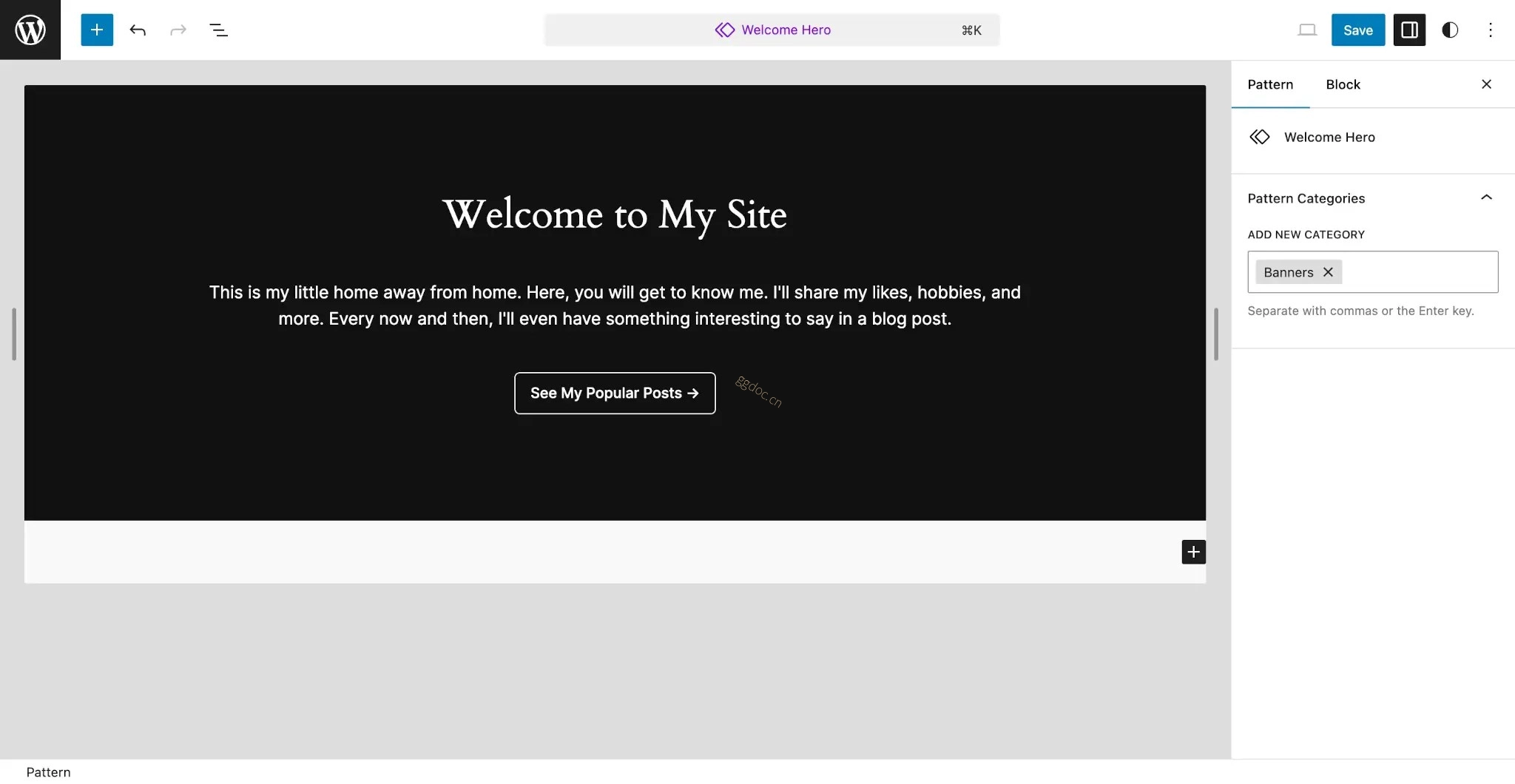
您也可以根据自己的需求对这个结构进行自定义,但初次创建模式时建议保持结构相对简单。
以上模式的块级标记格式如下(如需了解更多关于获取模式代码的信息,请阅读模式简介文章):
<!-- wp:cover {"overlayColor":"contrast","align":"full"} -->
<div class="wp-block-cover alignfull"><span aria-hidden="true" class="wp-block-cover__background has-contrast-background-color has-background-dim-100 has-background-dim"></span><div class="wp-block-cover__inner-container"><!-- wp:group {"style":{"spacing":{"blockGap":"2.5rem"}},"layout":{"type":"constrained","wideSize":"%","contentSize":"75%"}} -->
<div class="wp-block-group"><!-- wp:heading {"textAlign":"center"} -->
<h2 class="wp-block-heading has-text-align-center">欢迎来到我的网站</h2>
<!-- /wp:heading -->

<!-- wp:paragraph {"align":"center"} -->
<p class="has-text-align-center">这是我的第二个家。在这里大家可以了解我,我会分享自己的喜好、爱好等等。偶尔我还会在博客文章中写一些有趣的内容。<\/p>
<!-- /wp:paragraph -->

<!-- wp:buttons {"layout":{"type":"flex","justifyContent":"center"}} -->
<div class="wp-block-buttons"><!-- wp:button {"className":"is-style-outline"} -->
<div class="wp-block-button is-style-outline"><a class="wp-block-button__link wp-element-button">查看我的热门文章 →︎</a></div>
<!-- /wp:button --></div>
<!-- /wp:buttons --></div>
<!-- /wp:group --></div></div>
<!-- /wp:cover -->
在本文的剩余部分,您将使用同一个模式,学习如何注册它、取消注册它,以及进一步对其进行自定义。
一个良好的做法是将大多数模式包裹在Group、Cover或其他容器块中(即允许嵌套块的块)。这样就能让主题的用户在编辑器中更轻松地移动整个模式。您还可以为这个外部块添加CSS类,以便为整个模式应用自定义样式。
注册模式
在WordPress中,有两种注册块级模式的方法:
- 将包含块级标记的文件放入主题的/patterns文件夹中。
- 手动调用
register_block_pattern()函数。
最直接的方法是第一种。接下来几节中您将学习这两种方法,但除非遇到某些特殊情况,否则本手册建议使用/patterns文件夹。
使用/patterns目录注册模式
只要模式文件具有有效的模式文件头,WordPress就会识别并自动为您注册放置在主题/patterns文件夹中的任何模式文件。
文件头是指文件顶部的、带有PHP注释的代码,其中包含键值对列表。WordPress会解析这些信息以获取元数据,在此例中,这些元数据会被用来注册块级模式。
对于模式文件头,您可以设置以下键:
Title:可供翻译的、易于阅读的标题。Slug:以namespace/pattern-name形式表示的、属于该模式的唯一命名空间标识符。Categories:该模式所属的类别列表,以逗号分隔。Description:已注册模式的详细描述,仅会显示给屏幕阅读器。Viewport Width:预览模式时<iframe>视口的宽度(以像素为单位)。Inserter:是否在插入器中显示该模式,默认值为true。Keywords:与该模式相关的关键词列表,用户在插入器中搜索时会用到这些关键词。Block Types:与该模式关联的块类型列表,以逗号分隔。Post Types:限制该模式可使用的文章类型列表,以逗号分隔。默认为所有文章类型。Template Types:该模式适用的模板类型列表,以逗号分隔。
对于大多数模式,您至少应该添加Title、Slug和Categories字段。模式文件应如下所示:
<?php
/**
 * Title: Hero
 * Slug: themeslug/hero
 * Categories: featured
 */
?>
<!-- 模式代码放在这里。 -->现在,把上一节中复制的代码添加到主题的/patterns/hero.php文件中:
<?php
/**
 * Title: Hero
 * Slug: themeslug/hero
 * Categories: featured
 */
?>
<!-- wp:cover {"overlayColor":"contrast","align":"full"} -->
<div class="wp-block-cover alignfull"><span aria-hidden="true" class="wp-block-cover__background has-contrast-background-color has-background-dim-100 has-background-dim"></span><div class="wp-block-cover__inner-container"><!-- wp:group {"style":{"spacing":{"blockGap":"2.5rem"}},"layout":{"type":"constrained","wideSize":"%","contentSize":"75%"}} -->
<div class="wp-block-group"><!-- wp:heading {"textAlign":"center"} -->
<h2 class="wp-block-heading has-text-align-center">欢迎来到我的网站</h2>
<!-- /wp:heading -->

<!-- wp:paragraph {"align":"center"} -->
<p class="has-text-align-center">这是我的第二个家。在这里大家可以了解我,我会分享自己的喜好、爱好等等。偶尔我还会在博客文章中写一些有趣的内容。<\/p>
<!-- /wp:paragraph -->

<!-- wp:buttons {"layout":{"type":"flex","justifyContent":"center"}} -->
<div class="wp-block-buttons"><!-- wp:button {"className":"is-style-outline"} -->
<div class="wp-block-button is-style-outline"><a class="wp-block-button__link wp-element-button">查看我的热门文章 →︎</a></div>
<!-- /wp:button --></div>
<!-- /wp:buttons --></div>
<!-- /wp:group --></div></div>
<!-- /wp:cover -->现在,当您在WordPress中添加或编辑新文章时,应该会在插入器中看到您创建的模式。点击Patterns标签页,然后选择Featured:
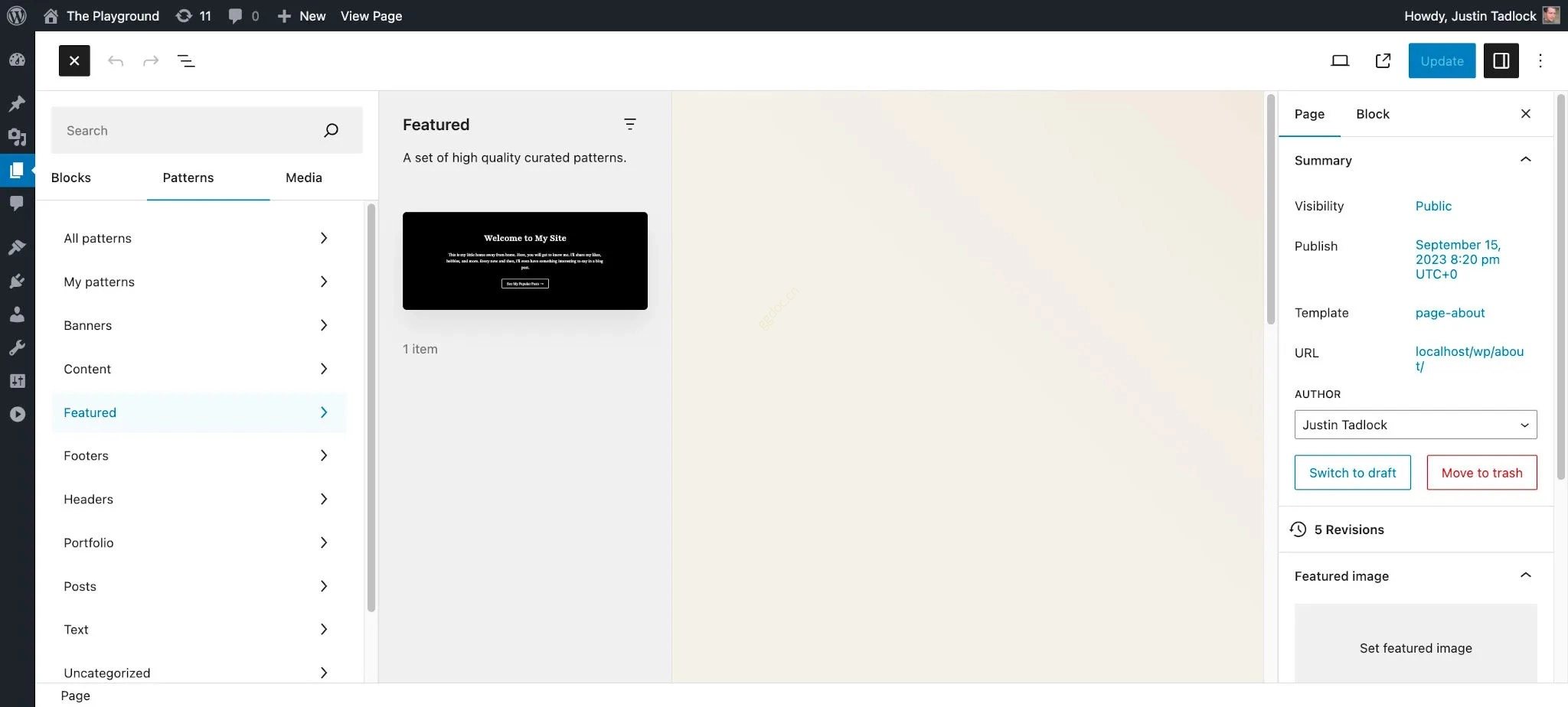
您还应该能在WordPress管理面的Appearance > Editor > Patterns中看到该模式。
使用PHP注册模式
如果您不想使用/patterns文件夹来实现自动注册模式,也可以选择通过PHP手动注册。这两种注册方法可以混合使用,但每个模式只能用其中一种方法注册。
要通过PHP注册块级模式,必须使用register_block_pattern()函数。它的函数签名如下:
register_block_pattern(
	string $pattern_name,
	array $pattern_properties
): bool该函数接受两个参数,并根据模式是否成功注册返回true或false:
$pattern_name:以namespace/pattern-name形式表示的、属于该模式的唯一命名空间标识符。$pattern_properties:包含用于定义该模式更多信息的属性数组:content:该模式的块级标记。title:可供翻译的、易于阅读的标题。categories:该模式所属的类别数组。description:已注册模式的详细描述,仅显示给屏幕阅读器。viewportWidth:预览模式时<iframe>视口的宽度(以像素为单位)。inserter:是否在插入器中显示该模式,默认值为true。keywords:与该模式相关的关键词数组,用户在插入器中搜索时会用到这些关键词。blockTypes:与该模式关联的块类型数组。postTypes:限制该模式可使用的文章类型数组,默认为所有文章类型。source:该模式的来源,由于该模式来自主题,因此应设置为theme。templateTypes:该模式适用的模板类型数组。
通过PHP注册模式时,应在init钩子中执行该操作。现在,通过在functions.php中添加以下代码,尝试注册您自定义的模式(请务必将自定义标记添加到content属性中):
add_action( 'init', 'themeslug_register_patterns' );

function themeslug_register_patterns() {
	register_block_pattern( 'themeslug/hero', array(
		'title'      => __( 'Hero', 'themeslug' ),
		'categories' => array( 'featured' ),
		'source'     => 'theme',
		'content'    => '<!-- 块级模式代码放在这里。 -->'
	) );
}
条件性注册模式
如果需要条件性地注册整个模式,根据您希望的注册方式,有两种可选方法。
在/patterns文件夹中条件性注册模式
如果您使用了将模式放入主题/patterns文件夹的自动注册方法,那么就无法真正实现条件性注册。这种情况下,您必须先取消注册该模式。
假设您只想在core/paragraph块已注册时才显示之前注册的英雄模式。在实际情况中,您可能会检查第三方块,而core/paragraph块只是为了举例才使用的。
在您的functions.php文件中尝试添加以下代码,以取消注册之前注册的模式:
add_action( 'init', 'themeslug.unregister_patterns', 999 );

function themeslug.unregister_patterns() {
	if ( WP_Block_Type_Registry::get_instance()->is_registered( 'core/paragraph' ) ) {
		unregister_block_pattern( 'themeslug/hero' );
	}
}上述代码使用了WP_Block_Type_Registry类,该类用于存储服务器端通过WordPress注册的所有块类型。通过使用该类的is_registered()方法,您可以判断某个块是否已注册。
通过register_block_pattern()条件性注册模式
如果您是通过PHP手动注册模式的,只需在调用register_block_pattern()时加上条件判断即可。
还是使用上面的例子,若要在core/paragraph块已注册时才注册您的模式,可在functions.php中添加以下代码:
add_action( 'init', 'themeslug_register_patterns', 999 );

function themeslug_register_patterns() {
	if ( WP_Block_Type_Registry::get_instance()->is_registered( 'core/paragraph' ) ) {
		register_block_pattern( 'themeslug/hero', array(
			'title'      => __( 'Hero', 'themeslug' ),
			'categories' => array( 'featured' ),
			'source'     => 'theme',
			'content'    => '<!-- 块级模式代码放在这里。 -->'
		) );
	}
}
取消注册模式
有时您需要取消注册块级模式,这样它们就不会出现在用户的插入器中。例如,您可能想要移除一些核心WordPress模式、父主题添加的模式(如果您正在创建子主题),或是第三方插件添加的模式。
当需要取消注册单个块级模式时,需使用unregister_block_pattern()函数:
unregister_block_pattern( string $pattern_name ): bool与注册模式类似,也建议在init钩子中执行取消注册操作。由于模式通常(但并非总是)在init钩子中以默认优先级10注册,因此建议使用更高的优先级,以便让您的代码在更晚的时候执行。
尝试在您的functions.php文件中添加以下代码,取消注册之前创建的自定义模式:
add_action( 'init', 'themeslug.unregister_patterns' );

function themeslug.unregister_patterns() {
	unregister_block_pattern( 'themeslug/hero' );
}
移除核心模式
虽然可以使用unregister_block_pattern()来取消注册单个核心WordPress模式,但您也可以通过禁用core-block-patterns功能来彻底移除所有核心模式。
要移除所有核心WordPress模式,请在主题的functions.php文件中添加以下代码:
add_action( 'after_setup_theme', 'themeslug_remove_core_patterns' );

function themeslug_remove_core_patterns() {
	remove_theme_support( 'core-block-patterns' );
}
禁用远程模式
WordPress还会自动从WordPress.org官方的模式目录加载一些模式。在某些情况下,您可能不希望加载这些模式,比如当它们与您的主题设计不匹配时。另外,如果您正在为客户构建网站,也可能不想让其站点调用远程API。无论出于何种原因,都可以通过过滤should_load_remote_block_patterns钩子来禁用此功能。
要禁用远程模式,请在您的functions.php文件中添加以下代码:
add_filter( 'should_load_remote_block_patterns', '__return_false' );模式类别
WordPress默认会注册几种块级模式类别:
featuredaboutaudio(在WordPress 6.4中添加)bannerbuttonscall-to-actioncolumnscontactfootergalleryheadermediaportfoliopostsquery(建议使用posts替代)servicesteamtestimonialstextvideo(在WordPress 6.4中添加)
通常建议为您的主题使用这些默认类别,这样能保持一致的界面,方便用户使用。不过有时您也可能希望添加自己的类别,或者删除已存在的类别。
在本文的这一部分,您将学习如何注册和取消注册自定义的块级模式类别。
注册模式类别
要注册用于放置一个或多个模式的自定义类别,必须使用register_block_pattern_category()函数:
register_block_pattern_category(
	string $category_name,
	array $category_properties
): bool
该函数接受两个参数:
$category_name:该类别的唯一ID/标识符,建议在前面加上主题的slug,格式为themeslug-category-name。$category_properties:用于定义该类别更多属性的数组:label:该类别的、可供翻译的标签/标题。description:该类别的描述,也可进行翻译。
尝试为您的主题添加一个新的自定义模式类别。在主题的functions.php文件中添加以下代码:
add_action( 'init', 'themeslug_register_pattern_categories' );

function themeslug_register_pattern_categories() {
	register_block_pattern_category( 'themeslug/custom', array(
		'label'       => __( '主题名称:自定义', 'themeslug' ),
		'description' => __( '属于该主题名称的自定义模式。', 'themeslug' )
	) );
}现在,可以将themeslug/custom类别添加到任何块级模式中:
<?php
/**
 * Title: Hero
 * Slug: themeslug/hero
 * Categories: featured, themeslug/custom
 */
?>
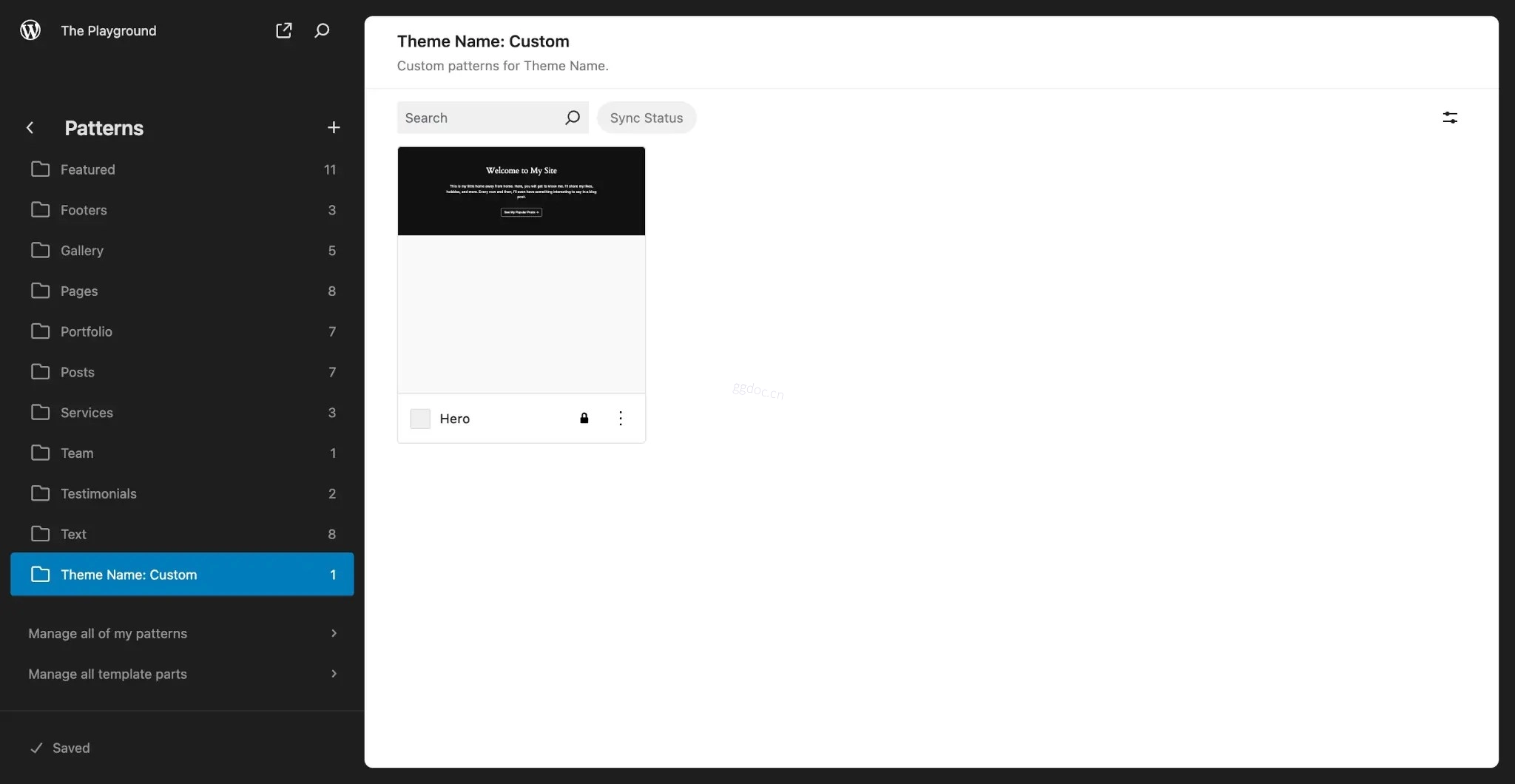
<!-- 块级模式代码放在这里。 -->属于该类别的所有已注册模式现在将会出现在插入器中,以及Appearance > Editor > Patterns(经典主题则为Appearance > Patterns)页面中:
取消注册模式类别
要取消注册已注册的模式类别,必须使用unregister_block_pattern_category()函数:
unregister_block_pattern_category( string $category_name ): bool该函数接受一个参数:
$category_name:要取消注册的已注册类别的名称(即标识符)。
尝试在您的functions.php文件中添加以下代码,取消注册之前注册的themeslug/custom类别:
add_action( 'init', 'themeslug.unregister_pattern_categories' );

function themeslug.unregister_pattern_categories() {
	register_block_pattern_category( 'themeslug/custom' );
}