自定义头部
自定义头部允许网站所有者上传自己的“标题”图片到他们的站点,这些图片可以放置在某些页面的顶部。用户可以通过管理面板中外观 > 头部部分的可视化编辑器对这些内容进行自定义和裁剪。您还可以在头部的下方或上方放置文本。为了支持流式布局和响应式设计,这些头部也可以是灵活的。主题使用 get_custom_header() 将头部放入其中,但必须首先将其添加到您的 functions.php 文件中以使用 add_theme_support()。自定义头部是可选的。
要设置一个基本的、灵活的、带文本的自定义头部,您可以包含以下代码:
<?php
function themename_custom_header_setup() {
	$args = array(
		'default-image'      => get_template_directory_uri() . 'img/default-image.jpg',
		'default-text-color' => '000',
		'width'              => 1000,
		'height'             => 250,
		'flex-width'         => true,
		'flex-height'        => true,
	);
	add_theme_support( 'custom-header', $args );
}
add_action( 'after_setup_theme', 'themename_custom_header_setup' );`after_setup_theme`钩子用于在主题加载后注册自定义头部。
什么是自定义头部?
当您在主题中启用“自定义头部”时,用户可以通过 WordPress 主题的定制器更改其头部图片。这使用户对其网站的外观拥有更多的控制权和灵活性。
为您的主题添加自定义头部支持
要在您的主题中启用自定义头部,请将以下内容添加到您的 functions.php 文件中:
add_theme_support( 'custom-header' );在启用自定义头部时,您可以通过向 add_theme_support() 函数传递参数来配置其他选项。
您可以使用数组向 add_theme_support 函数传递特定的配置选项:
<?php
function themename_custom_header_setup() {
	$defaults = array(
		// Default Header Image to display.
		'default-image'          => get_template_directory_uri() . '/images/headers/default.jpg',
		// Display the header text along with the image.
		'header-text'            => false,
		// Header text color default.
		'default-text-color'     => '000',
		// Header image width (in pixels).
		'width'                  => 1000,
		// Header image height (in pixels).
		'height'                 => 198,
		// Header image random rotation default.
		'random-default'         => false,
		// Enable upload of image file in admin.
		'uploads'                => false,
		// Function to be called in theme head section.
		'wp-head-callback'       => 'wphead_cb',
		// Function to be called in preview page head section.
		'admin-head-callback'    => 'adminhead_cb',
		// Function to produce preview markup in the admin screen.
		'admin-preview-callback' => 'adminpreview_cb',
	);
}
add_action( 'after_setup_theme', 'themename_custom_header_setup' );
灵活的头部图片
如果数组中未包含 flex-height 或 flex-width,则高度和宽度将是固定大小。如果包含了 flex-height 和 flex-width,则将使用建议的尺寸作为高度和宽度。
标题文本
默认情况下,用户将可以选择是否在图片上显示头部文本。没有选项强制用户在头部显示文本,但如果您想完全移除头部文本,可以在参数中将 'header-text' 设置为 'false'。这将移除头部文本以及切换它的选项。
示例
设置自定义头部图片
当用户首次安装您的主题时,您可以包含一个默认头部,该头部将在他们选择自己的头部之前被选中。这允许用户更快地设置您的主题并使用您的默认图像,直到准备好上传自己的图像。
设置宽度为 980px、高度为 60px 的默认头部图片:
<?php
$header_info = array(
	'width'         => 980,
	'height'        => 60,
	'default-image' => get_template_directory_uri() . '/images/sunset.jpg',
);
add_theme_support( 'custom-header', $header_info );

$header_images = array(
	'sunset' => array(
		'url'           => get_template_directory_uri() . '/images/sunset.jpg',
		'thumbnail_url' => get_template_directory_uri() . '/images/sunset_thumbnail.jpg',
		'description'   => 'Sunset',
	),
	'flower' => array(
		'url'           => get_template_directory_uri() . '/images/flower.jpg',
		'thumbnail_url' => get_template_directory_uri() . '/images/flower_thumbnail.jpg',
		'description'   => 'Flower',
	),
);
register_default_headers( $header_images );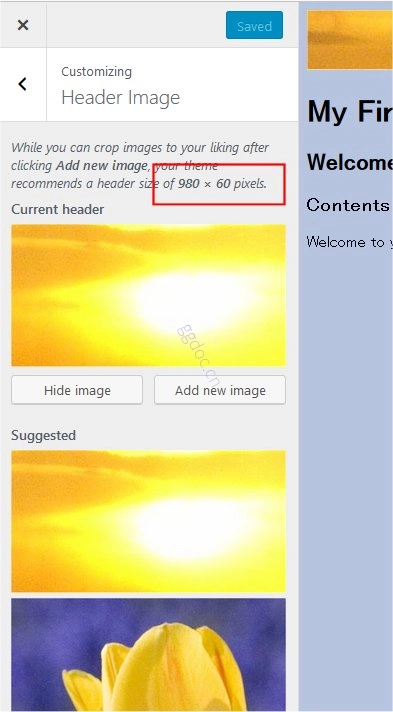
不要忘记调用 register_default_headers() 来注册默认图像。在这个例子中,sunset.jpg是默认图片,而flower.jpg是在定制器中的备选选择。
从管理屏幕点击外观 > 头部以在定制器中显示头部图片菜单。注意 add_theme_support() 中指定的宽度和高度作为推荐尺寸显示,并且flower.jpg显示为可选项。
使用灵活的头部
默认情况下,用户必须裁剪任何上传的图片以适应您指定的宽度和高度。但是,您可以通过指定 'flex-width' 和 'flex-height' 为 true,允许用户上传任意高度和宽度的图片。这将让用户在上传新照片时跳过裁剪步骤。
设置灵活的头部:
<?php
$args = array(
	'flex-width'    => true,
	'width'         => 980,
	'flex-height'   => true,
	'height'        => 200,
	'default-image' => get_template_directory_uri() . '/images/header.jpg',
);
add_theme_support( 'custom-header', $args );
更新您的 header.php 文件为:
<img alt="" src="<?php header_image(); ?>" width="<?php echo absint( get_custom_header()->width ); ?>" height="<?php echo absint( get_custom_header()->height ); ?>">显示自定义头部
要显示自定义头部,函数 get_header_image() 检索头部图片。get_custom_header()获取自定义头部数据。
例如,下面显示了如何使用自定义头部图片在主题中显示头部。下面的代码放入 header.php 文件中。
<?php if ( get_header_image() ) : ?>
	<div id="site-header">
		<a href="<?php echo esc_url( home_url( '/' ) ); ?>" rel="home">
			<img src="<?php header_image(); ?>" width="<?php echo absint( get_custom_header()->width ); ?>" height="<?php echo absint( get_custom_header()->height ); ?>" alt="<?php echo esc_attr( get_bloginfo( 'name', 'display' ) ); ?>">
		</a>
	</div>
<?php endif; ?>
向后兼容性
自定义头部在 WordPress 3.4 及以上版本中支持。如果您希望您的主题支持早于 3.4 版本的 WordPress 安装,您可以使用以下代码代替 add_theme_support( 'custom-header' );
<?php
global $wp_version;
if ( version_compare( $wp_version, '3.4', '>=' ) ) :
	add_theme_support( 'custom-header' );
else :
	add_custom_image_header( $wp_head_callback, $admin_head_callback );
endif;
函数参考
- header_image() 显示头部图片 URL。
- get_header_image() 检索自定义头部的头部图片。
- get_custom_header()获取头部图片数据。
- get_random_header_image() 检索自定义头部的头部图片。
- add_theme_support()为给定功能注册主题支持。
- register_default_headers()注册一组默认头部供定制器显示。