图库
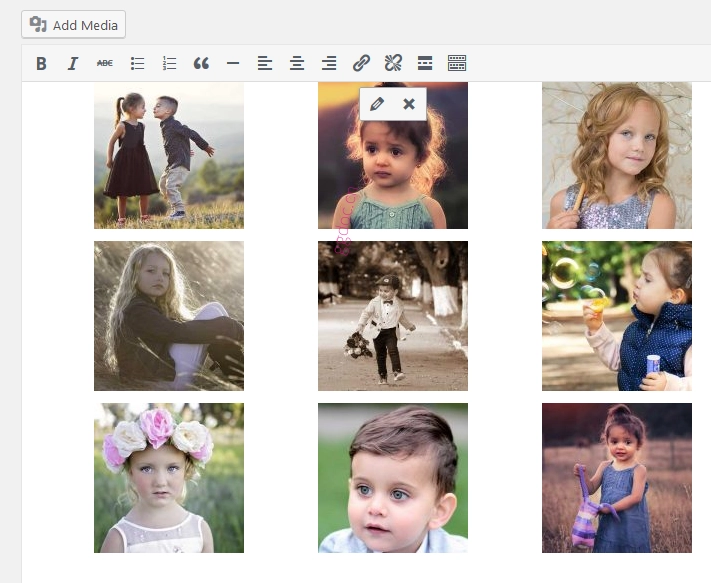
图库是展示您 WordPress 站点图片的最佳方式。WordPress 默认在媒体上传器中捆绑了创建图库功能,允许您创建一个简单的图库。
注意:添加图库之前,您的媒体库中必须已有图片。否则,您需要将图片上传到媒体库,然后才能继续创建图库。
图库短代码
图库功能允许您使用简单的短代码在文章和页面中添加一个或多个图像画廊。
图库短代码的基本形式如下:
[gallery]如果您在文章或页面中使用 [gallery] 短代码时未使用
ids 参数,则仅会显示“附加”到该文章或页面的图片。如果需要添加多个具有 ID 的图片,请使用以下示例短代码。
//注意:10、205、552 和 607 是相应图像的 ID。
[gallery ids="10, 205, 552, 607"]
NOTE: 找到图库中图片的正确 ID。进入媒体库,点击相应的图像,ID 将出现在 URL 上。
要从模板文件中使用短代码,请使用 do_shortcode() 函数。将其插入到您的模板文件中:
<?php echo do_shortcode( [gallery] ); ?>如果您需要使用带有 ID 的短代码,请在您的模板文件中的以下位置插入此代码:
<?php echo do_shortcode( [gallery ids="10, 205, 552, 607"] ); ?>用法
可以使用以下语法指定许多选项:
[gallery option1="value1" option2="value2"]如果您想在模板文件中直接打印图库,请使用 `do_shortcode()` 函数如下所示:
<?php echo do_shortcode( '[gallery option1="value1"]' ); ?>如果您需要过滤短代码,以下示例为您提供了一些提示。
// 注意:使用 'the_content' 过滤器来筛选从数据库中检索后
//并在打印到屏幕之前文章的内容。
<?php
$gallery_shortcode = '[gallery id="' . intval( $post->post_parent ) . '"]';
print apply_filters( 'the_content', $gallery_shortcode );
?>
支持的选项
图库短代码支持以下列出的基本选项:
排序方式 (Orderby)
'orderby' 指定缩略图显示的顺序。默认顺序为 'menu_order'。
- menu_order: 您可以在“添加媒体”弹出窗口的图库标签页中重新排列图像
- title: 按媒体库中图像的标题排序
- post_date: 按日期/时间排序
- rand: 随机排序
- ID: 指定帖子 ID
顺序 (Order)
order 指定用于显示缩略图的排序顺序:ASC(升序)或 DESC(降序)。例如,按 ID 和 DESC 排序:
[gallery order="DESC" orderby="ID"]如果您需要在模板文件中打印它,请使用 do_shortcode() 函数;
<?php echo do_shortcode( '[gallery]' ); ?>列数 (columns)
The Columns options specify the number of columns in the gallery. The default value is 3.
如果您想增加图库中的列数,请使用以下短代码。
[gallery columns="4"]如果您需要在模板文件中打印它,请使用 do_shortcode() 函数;
<?php echo do_shortcode(' [gallery columns="4"] '); ?>ID (IDs)
The IDs option on the gallery shortcode loads images with specific post IDs.图库短代码上的 ID 选项加载具有特定帖子 ID 的图像。
If you want to display the attached image with the specific post ID, follow the following code example.如果您想显示具有特定帖子 ID 的附加图像,请遵循以下代码示例。
//注意:删除括号和 'gallery' 以及括号和 `123"`之间的每个空格。
//这里"123"代表帖子 ID。如果您要显示多个 ID,请用逗号 `,` 分隔 ID。
[ gallery id="123" ]
Use ‘do_shortcode’ function to print the gallery with IDs on template files like below:使用 'do_shortcode' 函数在模板文件中打印带有 ID 的图库如下所示:
//注意:删除括号和 'gallery' 以及括号和 `123"`之间的每个空格。
<?php echo do_shortcode(' [ gallery id="123" ] '); ?>
尺寸 (Size)
Size determines the image size to use for the thumbnail display. Valid values include “thumbnail”, “medium”, “large”, “full” and any other additional image size that was registered with add_image_size(). The default value is “thumbnail”. The size of the images for “thumbnail”, “medium” and “large” can be configured in WordPress admin panel under Settings > Media.尺寸确定用于缩略图显示的图像大小。有效值包括“缩略图”、“中等”、“大”、“完整”以及使用 add_image_size() 注册的任何其他附加图像大小。默认值为“缩略图”。 “缩略图”、 “中等”和“大”的图像尺寸可以在 WordPress 管理面板中的设置 > 媒体下进行配置。
For example, to display a gallery of medium sized images:例如,要显示中尺寸的图库:
[gallery size="medium"]Some advanced options are also available on Gallery shortcodes.图库短代码还提供了一些高级选项。
项目标签 (itemtag)
The name of the HTML tag used to enclose each item in the gallery. The default is “dl”.用于包围画廊中每个项目的 HTML 标记的名称。默认为“dl"。
图标标签 (icontag)
The name of the HTMLtag used to enclose each thumbnail icon in the gallery. The default is “dt”.用于包围图库中每个缩略图图标的 HTML 标记的名称。默认为“dt"。
说明标签 (captiontag)
The name of the HTML tag used to enclose each caption. The default is “dd”.用于包围每个说明的 HTML 标记名称。默认为“dd"。
You are allowed to change the defaults.您可以更改默认值。
[gallery itemtag="div" icontag="span" captiontag="p"]链接 (Link)
Specify where you want the image to link. The default value links to the attachment’s permalink. Options:指定您希望图像链接的位置。默认值链接到附件的 永久链接。选项:
- file – 直接链接到图像文件
- none – 无链接
Example:示例:
[gallery link="file"]包含 (Include)
Include allows you to insert an “array” of comma separated attachment IDs to show only the images from these attachments.Include 允许您插入一个“数组”,其中用逗号分隔的附件 ID,以仅显示来自这些附件的图像。
[gallery include="23,39,45"]排除 (Exclude)
Exclude callows you to insert an “array” of comma separated attachment IDs to not show the images from these attachments. Please note that include and exclude cannot be used together.Exclude 允许您插入一个“数组”,其中用逗号分隔的附件 ID,以不显示来自这些附件的图像。请注意,include(包含)和 exclude(排除)不能一起使用。
[gallery exclude="21,32,43"]参考资料 (References)
For more technical details take a reference from below links有关更多技术细节,请从以下链接中参考。