本页面介绍应用程序后端与 AI 服务之间的身份验证。编辑器向 AI 服务发出的每个请求都会携带一个签名的 JWT — 服务通过这种方式识别用户、执行权限控制,并隔离对话。令牌端点运行在应用程序后端;编辑器通过在 TinyMCE 集成中配置的 tinymceai_token_provider 回调自动调用该端点。
在配置 JWT 之前,请先完成数据层和LLM 提供商的设置。配置完 JWT 后,继续进行TinyMCE 集成,将编辑器连接到令牌端点。
本地部署的 AI 服务使用 HS256(HMAC-SHA256,对称共享密钥)进行 JSON Web Token(JWT)身份验证。这与使用 RS256 的 Tiny Cloud AI 服务不同。
对于本地部署,请勿遵循云 JWT 指南。本地验证器会静默拒绝使用 RS256 签名的令牌,返回
invalid-jwt-signature,且不会提示算法错误。
端到端流程
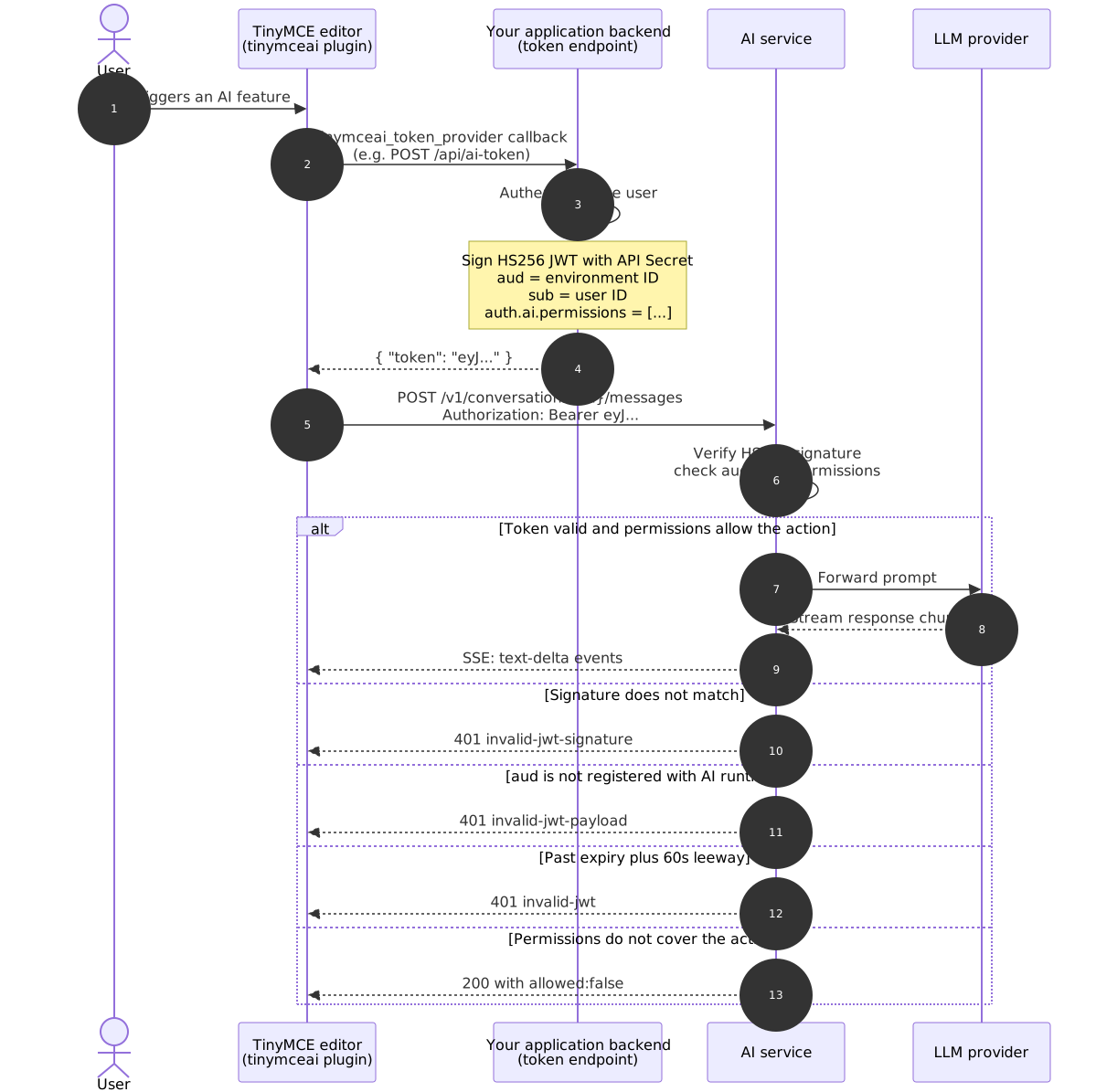
共享密钥(API Secret)永远不会离开应用程序后端。编辑器只能看到签名的令牌,AI 服务也只能看到签名的令牌;两者都无法直接访问该密钥。
签名模型
| 属性 | 值 |
|---|---|
算法 |
|
密钥类型 | 对称共享密钥 |
密钥来源 | 在管理面板中,通过某个环境内的访问密钥生成的API Secret |
头部格式 |
|
将实现固定为 HS256。
API Secret
API Secret 是在管理面板中创建环境内的访问密钥时生成的,位置为 环境 → <env> → 访问密钥 → 新建访问密钥。
该密钥在创建界面仅显示一次。请立即将其复制到密钥管理器(如 Vault、AWS Secrets Manager、Doppler 或本地的
.env文件)中。如果密钥丢失,请进行轮换:创建一个新的访问密钥,部署新的密钥,然后撤销旧的密钥。
这不是
ENVIRONMENTS_MANAGEMENT_SECRET_KEY环境变量;该变量用于管理面板登录,而非面向用户的 AI 令牌。混淆两者会导致invalid-jwt-signature错误。
API Secret 与 ENVIRONMENTS_MANAGEMENT_SECRET_KEY 的比较
| 凭据 | 用途 | 使用者 |
|---|---|---|
API Secret | 为呈现给 AI 运行时端点的面向用户的 JWT 签名。在环境内按访问密钥创建。 | 应用程序令牌端点。绝不在任何管理调用中出现。 |
| 用于登录管理面板的密码。作为 AI 服务容器的环境变量设置。 | 管理面板 UI。 |
这两种凭据互不相关。将其中一种用作另一种会导致 invalid-jwt-signature 错误。
必需的声明
每个令牌必须包含以下声明。
| 声明 | 类型 | 描述 |
|---|---|---|
| 字符串 | 环境 ID,从管理面板复制(例如 |
| 数字 | 签发时间,自纪元(UTC)以来的秒数。 |
| 数字 | 过期时间,自纪元(UTC)以来的秒数。建议演示环境使用 |
| 字符串 | 唯一且稳定的用户标识符。对话历史按 |
|
| 功能权限字符串数组。参见下文的权限参考。通配符( |
TinyMCE AI 插件在将令牌发送给 AI 服务之前,也会检查每个令牌的声明。参见负载属性。
可选声明
| 声明 | 类型 | 描述 |
|---|---|---|
| string | 显示在对话历史界面中的显示名称。 |
| string | 显示在对话历史界面中的邮箱地址。不用于身份验证。 |
验证器会忽略额外的未知声明。标准 JWT 声明(iss、nbf、jti)即使包含也不会造成危害;验证器不会验证这些声明,但会使其通过。
权限参考
这是 AI 服务的规范权限列表。
对话和全局功能
| 权限 | 授权内容 |
|---|---|
| 所有对话操作:创建、列表、发送消息、删除和网络搜索 |
| 创建新对话 |
| 列出并读取现有对话 |
| 创建对话并发送消息 |
| 删除对话 |
| 在对话中启用网络搜索开关。如果没有此权限,即使设置了 |
| 访问内置 agent 模型(模型 ID |
| 访问通过 |
| 所有内置快速操作(改写、总结、扩展、翻译、更改语气及相关操作) |
| 所有内置审阅功能(正确性、清晰度、可读性、语气及相关检查) |
模型权限语法
ai:models:<provider>:<model-id> 用于选择特定的自定义模型。解析器不是贪婪的冒号拆分器;它能理解 <model-id> 本身可能包含冒号和点号。
示例:
ai:models:openai:gpt-5-mini
ai:models:openai:gpt-4o
ai:models:anthropic:claude-sonnet-4-5
ai:models:bedrock:us.anthropic.claude-sonnet-4-20250514-v1:0
ai:models:vertex:gemini-2.5-pro
ai:models:azure:my-gpt5-deployment
<provider> 是 PROVIDERS 中提供者的键,而不是其 name。GET /v1/models/1 中每个模型的 provider 字段显示的是用于展示的 name,因此不要根据该字段构建权限字符串。
对于 Azure,<model-id> 是在 Azure 门户中配置的部署名称,而不是底层的 OpenAI 模型名称。
对于带有推理配置文件前缀(us.、eu.、apac.)和嵌入版本冒号(v1:0)的 Bedrock 模型,请原样包含这些内容;解析器会处理它们。
不要在 auth.ai.permissions 中包含的内容
| 不要使用 | 原因 |
|---|---|
| 出现在 cloud JWT 文档中。本地服务会在每个端点以 |
| 会被拒绝。验证器要求结构化的权限字符串。 |
| 本地服务要求显式的 |
单个字符串而非数组 | 会被拒绝。 |
完全访问集
对于演示和 admin 级用户,标准授权如下:
[
  "ai:conversations:*",
  "ai:models:agent",
  "ai:actions:system:*",
  "ai:reviews:system:*"
]
当通过 MODELS 环境变量添加自定义模型时,为每个要在选择器中显示的自定义模型添加一个 ai:models:<provider>:<model-id> 条目。
有效负载示例
具有单个 OpenAI 模型完全访问权限的已登录用户的完整、解码后的有效负载:
{
  "aud": "5f1a2b3c-1234-5678-9abc-def012345678",
  "iat": 1746950400,
  "exp": 1746954000,
  "sub": "user_8f3c9a12",
  "user": {
    "name": "Priya Patel",
    "email": "priya.patel@example.com"
  },
  "auth": {
    "ai": {
      "permissions": [
        "ai:conversations:*",
        "ai:models:agent",
        "ai:models:openai:gpt-5-mini",
        "ai:actions:system:*",
        "ai:reviews:system:*"
      ]
    }
  }
}
使用 API Secret 以 HS256 签名后,发送如下:
Authorization: Bearer eyJhbGciOiJIUzI1NiIs...
时钟偏移容差
服务允许 exp 声明最多有 60 秒的时钟偏移。请使用网络时间协议 (NTP) 保持令牌服务器和 AI 服务同步。
生产环境令牌端点示例
每个示例都会从环境变量中读取 AI_ENV_ID 和 AI_API_SECRET,通过框架的 session/auth 层对用户进行身份验证,签署 HS256 token,并返回格式为 JSON 的 {"token": "…"}。该端点在应用程序后端运行;AI 服务从不直接查看 API Secret。
| 语言 | 框架 / 库 |
|---|---|
Node.js | Express + |
Python | Django + |
PHP | Laravel + |
Ruby | Rails + |
C# | .NET + |
Go |
|
Java | Spring Boot + |
npm install express jsonwebtokenToken endpoint
const express = require('express');
const jwt = require('jsonwebtoken');

const app = express();
const ENV_ID = process.env.AI_ENV_ID;
const API_SECRET = process.env.AI_API_SECRET;

app.post('/api/ai-token', requireLogin, (req, res) => {
  const user = req.user;
  const now = Math.floor(Date.now() / 1000);

  const payload = {
    aud: ENV_ID,
    iat: now,
    exp: now + 3600,
    sub: String(user.id),
    user: {
      name: user.displayName,
      email: user.email,
    },
    auth: {
      ai: {
        permissions: [
          'ai:conversations:*',
          'ai:models:agent',
          'ai:actions:system:*',
          'ai:reviews:system:*',
        ],
      },
    },
  };

  const token = jwt.sign(payload, API_SECRET, { algorithm: 'HS256' });
  res.json({ token });
});

function requireLogin(req, res, next) {
  if (!req.user) return res.status(401).json({ error: 'unauthenticated' });
  next();
}

app.listen(3000);
Python (Django + PyJWT)安装依赖pip install PyJWTToken endpoint
import os
import time
import jwt
from django.http import JsonResponse
from django.views.decorators.http import require_POST
from django.contrib.auth.decorators import login_required

ENV_ID = os.environ["AI_ENV_ID"]
API_SECRET = os.environ["AI_API_SECRET"]

@require_POST
@login_required
def ai_token(request):
    user = request.user
    now = int(time.time())

    payload = {
        "aud": ENV_ID,
        "iat": now,
        "exp": now + 3600,
        "sub": str(user.pk),
        "user": {
            "name": user.get_full_name() or user.username,
            "email": user.email,
        },
        "auth": {
            "ai": {
                "permissions": [
                    "ai:conversations:*",
                    "ai:models:agent",
                    "ai:actions:system:*",
                    "ai:reviews:system:*",
                ],
            },
        },
    }

    token = jwt.encode(payload, API_SECRET, algorithm="HS256")
    return JsonResponse({"token": token})
在 urls.py 中注册视图:
from django.urls import path
from . import views

urlpatterns = [
    path("api/ai-token", views.ai_token, name="ai-token"),
]
Python (Flask + PyJWT)安装依赖pip install Flask PyJWTToken endpoint
import os
import time
import jwt
from flask import Flask, jsonify, abort, session

app = Flask(__name__)
ENV_ID = os.environ["AI_ENV_ID"]
API_SECRET = os.environ["AI_API_SECRET"]

@app.post("/api/ai-token")
def ai_token():
    user = session.get("user")
    if not user:
        abort(401)

    now = int(time.time())
    payload = {
        "aud": ENV_ID,
        "iat": now,
        "exp": now + 3600,
        "sub": str(user["id"]),
        "user": {
            "name": user["name"],
            "email": user["email"],
        },
        "auth": {
            "ai": {
                "permissions": [
                    "ai:conversations:*",
                    "ai:models:agent",
                    "ai:actions:system:*",
                    "ai:reviews:system:*",
                ],
            },
        },
    }

    token = jwt.encode(payload, API_SECRET, algorithm="HS256")
    return jsonify({"token": token})
PHP (Laravel + firebase/php-jwt)安装依赖composer require firebase/php-jwt
令牌端点
<?php

namespace App\Http\Controllers;

use Firebase\JWT\JWT;
use Illuminate\Http\JsonResponse;
use Illuminate\Support\Facades\Auth;

class AiTokenController extends Controller
{
    public function issue(): JsonResponse
    {
        $user = Auth::user();
        if (!$user) {
            abort(401);
        }

        $envId = env('AI_ENV_ID');
        $apiSecret = env('AI_API_SECRET');

        $now = time();
        $payload = [
            'aud' => $envId,
            'iat' => $now,
            'exp' => $now + 3600,
            'sub' => (string) $user->id,
            'user' => [
                'name' => $user->name,
                'email' => $user->email,
            ],
            'auth' => [
                'ai' => [
                    'permissions' => [
                        'ai:conversations:*',
                        'ai:models:agent',
                        'ai:actions:system:*',
                        'ai:reviews:system:*',
                    ],
                ],
            ],
        ];

        $token = JWT::encode($payload, $apiSecret, 'HS256');
        return response()->json(['token' => $token]);
    }
}路由(routes/web.php 或 routes/api.php):
use App\Http\Controllers\AiTokenController;

Route::post('/api/ai-token', [AiTokenController::class, 'issue'])
    ->middleware('auth');
Ruby (Rails + jwt)
# Gemfile
gem 'jwt'
class AiTokensController < ApplicationController
  before_action :authenticate_user!

  def create
    env_id     = ENV.fetch('AI_ENV_ID')
    api_secret = ENV.fetch('AI_API_SECRET')

    now = Time.now.to_i
    payload = {
      aud: env_id,
      iat: now,
      exp: now + 3600,
      sub: current_user.id.to_s,
      user: {
        name:  current_user.name,
        email: current_user.email
      },
      auth: {
        ai: {
          permissions: [
            'ai:conversations:*',
            'ai:models:agent',
            'ai:actions:system:*',
            'ai:reviews:system:*'
          ]
        }
      }
    }

    token = JWT.encode(payload, api_secret, 'HS256')
    render json: { token: token }
  end
end路由(config/routes.rb):
post '/api/ai-token', to: 'ai_tokens#create'
C# (.NET + System.IdentityModel.Tokens.Jwt)
安装依赖
dotnet add package System.IdentityModel.Tokens.Jwt
令牌端点
using System;
using System.IdentityModel.Tokens.Jwt;
using System.Security.Claims;
using System.Text;
using System.Text.Json;
using Microsoft.AspNetCore.Authorization;
using Microsoft.AspNetCore.Mvc;
using Microsoft.IdentityModel.Tokens;

[ApiController]
[Route("api/ai-token")]
[Authorize]
public class AiTokenController : ControllerBase
{
    [HttpPost]
    public IActionResult Issue()
    {
        var envId     = Environment.GetEnvironmentVariable("AI_ENV_ID")!;
        var apiSecret = Environment.GetEnvironmentVariable("AI_API_SECRET")!;

        var userId    = User.FindFirst(ClaimTypes.NameIdentifier)!.Value;
        var userName  = User.FindFirst(ClaimTypes.Name)?.Value ?? "";
        var userEmail = User.FindFirst(ClaimTypes.Email)?.Value ?? "";

        var now = DateTimeOffset.UtcNow.ToUnixTimeSeconds();

        var payload = new JwtPayload
        {
            { "aud", envId },
            { "iat", now },
            { "exp", now + 3600 },
            { "sub", userId },
            { "user", new { name = userName, email = userEmail } },
            { "auth", new {
                ai = new {
                    permissions = new[] {
                        "ai:conversations:*",
                        "ai:models:agent",
                        "ai:actions:system:*",
                        "ai:reviews:system:*"
                    }
                }
            }}
        };

        var key = new SymmetricSecurityKey(Encoding.UTF8.GetBytes(apiSecret));
        var creds = new SigningCredentials(key, SecurityAlgorithms.HmacSha256);
        var header = new JwtHeader(creds);

        var jwt = new JwtSecurityToken(header, payload);
        var token = new JwtSecurityTokenHandler().WriteToken(jwt);

        return Ok(new { token });
    }
}
Go (golang-jwt/jwt/v5)
安装依赖
go get github.com/golang-jwt/jwt/v5Token 端点
package main

import (
    "encoding/json"
    "net/http"
    "os"
    "time"

    "github.com/golang-jwt/jwt/v5"
)

type tokenResponse struct {
    Token string `json:"token"`
}

func aiTokenHandler(w http.ResponseWriter, r *http.Request) {
    user, ok := userFromSession(r)
    if !ok {
        http.Error(w, "unauthenticated", http.StatusUnauthorized)
        return
    }

    envID := os.Getenv("AI_ENV_ID")
    apiSecret := os.Getenv("AI_API_SECRET")

    now := time.Now().Unix()
    claims := jwt.MapClaims{
        "aud": envID,
        "iat": now,
        "exp": now + 3600,
        "sub": user.ID,
        "user": map[string]string{
            "name":  user.Name,
            "email": user.Email,
        },
        "auth": map[string]any{
            "ai": map[string]any{
                "permissions": []string{
                    "ai:conversations:*",
                    "ai:models:agent",
                    "ai:actions:system:*",
                    "ai:reviews:system:*",
                },
            },
        },
    }

    token := jwt.NewWithClaims(jwt.SigningMethodHS256, claims)
    signed, err := token.SignedString([]byte(apiSecret))
    if err != nil {
        http.Error(w, "sign failed", http.StatusInternalServerError)
        return
    }

    w.Header().Set("Content-Type", "application/json")
    json.NewEncoder(w).Encode(tokenResponse{Token: signed})
}

func main() {
    http.HandleFunc("/api/ai-token", aiTokenHandler)
    http.ListenAndServe(":3000", nil)
}
Java(Spring Boot + jjwt)<!-- pom.xml --> <dependency> <groupId>io.jsonwebtoken</groupId> <artifactId>jjwt-api</artifactId> <version>0.12.6</version> </dependency> <dependency> <groupId>io.jsonwebtoken</groupId> <artifactId>jjwt-impl</artifactId> <version>0.12.6</version> <scope>runtime</scope> </dependency> <dependency> <groupId>io.jsonwebtoken</groupId> <artifactId>jjwt-jackson</artifactId> <version>0.12.6</version> <scope>runtime</scope> </dependency>
package com.example.ai;

import io.jsonwebtoken.Jwts;
import io.jsonwebtoken.security.Keys;
import org.springframework.security.core.annotation.AuthenticationPrincipal;
import org.springframework.security.core.userdetails.UserDetails;
import org.springframework.web.bind.annotation.*;

import javax.crypto.SecretKey;
import java.nio.charset.StandardCharsets;
import java.time.Instant;
import java.util.List;
import java.util.Map;

@RestController
@RequestMapping("/api/ai-token")
public class AiTokenController {

    private final String envId     = System.getenv("AI_ENV_ID");
    private final String apiSecret = System.getenv("AI_API_SECRET");

    @PostMapping
    public Map<String, String> issue(@AuthenticationPrincipal UserDetails user) {
        SecretKey key = Keys.hmacShaKeyFor(apiSecret.getBytes(StandardCharsets.UTF_8));
        Instant now = Instant.now();

        String token = Jwts.builder()
                .claim("aud", envId)
                .issuedAt(java.util.Date.from(now))
                .expiration(java.util.Date.from(now.plusSeconds(3600)))
                .subject(user.getUsername())
                .claim("user", Map.of(
                        "name",  user.getUsername(),
                        "email", ""
                ))
                .claim("auth", Map.of(
                        "ai", Map.of(
                                "permissions", List.of(
                                        "ai:conversations:*",
                                        "ai:models:agent",
                                        "ai:actions:system:*",
                                        "ai:reviews:system:*"
                                )
                        )
                ))
                .signWith(key, Jwts.SIG.HS256)
                .compact();

        return Map.of("token", token);
    }
}
编辑器端配置
配置 TinyMCE 编辑器以从应用程序端点获取 token。插件按需调用提供程序,并在 token 接近过期时重新获取。
tinymce.init({
  selector: 'textarea',
  plugins: 'tinymceai',
  toolbar: 'undo redo | bold italic | tinymceai-chat tinymceai-review tinymceai-quickactions',

  tinymceai_service_url: 'https://ai.example.com',

  tinymceai_token_provider: () =>
    fetch('/api/ai-token', { method: 'POST', credentials: 'include' })
      .then(r => r.json())
      .then(d => ({ token: d.token })),
});
不要在应用程序代码中缓存 JWT。插件在初始化时以及 token 接近过期时会再次调用提供程序;插件内部管理刷新。
提供程序必须返回一个解析为 { token: '<jwt>' } 的 Promise。任何其他返回值都会导致错误;有关错误消息,请参阅 tinymceai_token_provider。如果提供程序拒绝或返回非 OK 响应,插件会在编辑器界面中显示错误。
当 token 端点依赖会话 cookie 时,在 fetch 请求中设置credentials: 'include'。如果不设置,浏览器不会在跨域请求中发送 cookie。当 token 端点与编辑器同源时,credentials: 'include'无害但不必要的。
对于跨域配置,请配置后端服务器以响应 Access-Control-Allow-Origin: <editor-origin>(不是 *)和 Access-Control-Allow-Credentials: true。设置会话 cookie 时使用 SameSite=None; Secure。
对于特定框架(React、Vue、Angular)的集成,请参阅 TinyMCE 集成。
权限门控模式
常见的部署形态:一个 AI 服务为多个订阅层级提供服务。token 端点根据角色、计划或租户推导权限集。
分层权限(basic / pro / enterprise)
function permissionsFor(user) {
  const base = [
    'ai:conversations:*',
    'ai:actions:system:*',
  ];

  switch (user.plan) {
    case 'basic':
      return [
        ...base,
        'ai:models:openai:gpt-5-mini',
      ];

    case 'pro':
      return [
        ...base,
        'ai:reviews:system:*',
        'ai:models:agent',
        'ai:models:openai:gpt-5-mini',
        'ai:models:openai:gpt-4o',
      ];

    case 'enterprise':
      return [
        ...base,
        'ai:reviews:system:*',
        'ai:models:agent',
        'ai:models:openai:gpt-5-mini',
        'ai:models:openai:gpt-4o',
        'ai:models:anthropic:claude-sonnet-4-5',
        'ai:models:bedrock:us.anthropic.claude-sonnet-4-20250514-v1:0',
      ];

    default:
      return base;
  }
}
只读查看器
对于应该公开历史记录但不允许新对话的部署:
[
  'ai:conversations:read',
]
多租户:独立环境
如果租户需要完全隔离(独立的对话历史、独立访问密钥、独立审计日志),请在管理面板中为每个租户分配独立的 Environment,并使用特定租户的 aud 和 API Secret 值生成 token。有关实现细节,请参阅多租户部署。
验证和故障排除
解码 token 而不进行验证
jwt.io 接受粘贴的 token 并显示 header 和 payload。或者:
python3 -c "import jwt; print(jwt.decode('<token>', options={'verify_signature': False}))"node -e "console.log(JSON.parse(Buffer.from(process.argv[1].split('.')[1],'base64url')))" '<token>'调试时从这里开始。大多数"认证失败"反映的是 claim 值错误而不是签名问题。
常见失败模式
| 症状 | 原因 | 修复 |
|---|---|---|
| API Secret 不匹配 | 验证 |
| Token 使用 RS256 签名 | 切换到 HS256 并使用 API Secret。请参阅页面顶部警告。 |
|
| 确认 Management Panel 中的 Environment ID 与 |
| 通过 management API 创建的环境没有附加 AI 服务 | 通过面板重新创建。请参阅 创建环境和访问密钥。 |
| Token 超过 | 请求新的 token。服务器允许 60 秒的时钟偏差容差;超过此范围的将被拒绝并返回 |
| 环境在 | 通过 Management Panel UI 重新创建。 |
每个端点都返回 |
| 必须是 |
仅特定端点返回 | 缺少特定权限 | 解码 token,对照上表检查 |
Token 被静默拒绝,没有解码错误 | RS256 签名 | 使用 HS256 重新签名。 |
|
| 某些 JWT 库默认使用数组 |
编辑器显示错误,浏览器控制台记录 | 通常由上述 claim 不匹配导致 | 根据错误消息确定根本原因。 |
Token endpoint 返回了非 JSON 格式,返回的 token 为嵌套对象,返回的 token 缺少必需的 claims,或者 CORS 阻止了请求。
打开浏览器开发者工具 → Network → 检查来自 /api/ai-token 的响应。
手动验证 token
TOKEN=$(curl -s -X POST http://localhost:3000/api/ai-token | jq -r .token)

curl -i https://ai.example.com/v1/conversations \
  -H "Authorization: Bearer $TOKEN" \
  -H "Content-Type: application/json" \
  -d '{"id":"token-check-1"}'
返回 201 Created 确认整个流程正常工作:secret、claims、permissions、environment 注册。
Token 生命周期指南
| 场景 | 推荐的 exp - iat |
|---|---|
本地开发 | 1 小时 ( |
演示 | 1 小时 |
生产环境 | 5-15 分钟 ( |
高安全性/受监管 | 5 分钟,并在 auth 层使用短期会话 |
短期 token 可限制 token 通过浏览器扩展、日志捕获或错误报告泄露时的暴露风险。编辑器会在需要时通过 tinymceai_token_provider 重新请求 token,因此长期 token 没有实际好处。
多租户部署
对于从单个 AI 服务实例服务多个客户的 SaaS 平台,Environments 提供完全的租户隔离。
架构
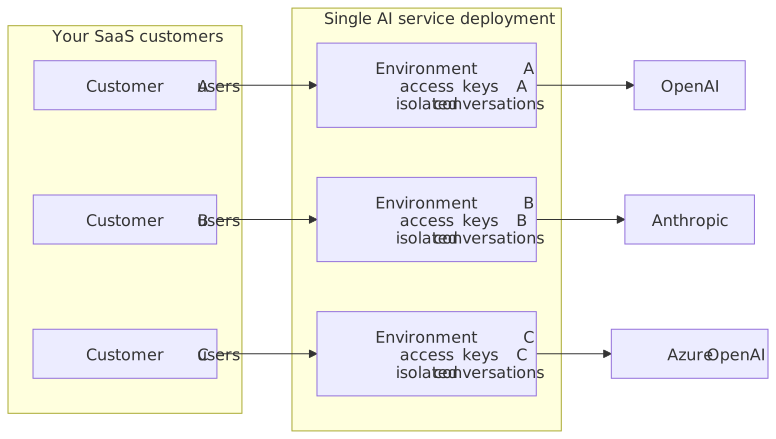
每个 Environment 提供:
独立的访问密钥和单独的轮换计划
隔离的对话历史记录(查询在 environment 内按
sub分区)单独的使用情况跟踪(通过 Langfuse 或按 environment 键控的自定义指标管道)
实现
通过管理面板为每个租户创建一个 Environment:
客户 A → Environment
env-customer-a客户 B → Environment
env-customer-b客户 C → Environment
env-customer-c
将 token 生成路由到正确的 Environment:
多租户 token endpointapp.post('/api/ai-token', requireAuth, (req, res) => { const customer = getCustomerConfig(req.user.organizationId); const token = jwt.sign({ aud: customer.envId, sub: String(req.user.id), user: { name: req.user.name, email: req.user.email }, auth: { ai: { permissions: getPermissionsForPlan(customer.plan) } } }, customer.apiSecret, { algorithm: 'HS256', expiresIn: '1h' }); res.json({ token }); }); function getPermissionsForPlan(plan) { switch (plan) { case 'enterprise': return ['ai:conversations:*', 'ai:models:agent', 'ai:actions:system:*', 'ai:reviews:system:*']; case 'pro': return ['ai:conversations:*', 'ai:actions:system:*']; case 'basic': return ['ai:actions:system:*']; } } function getCustomerConfig(tenantId) { return { envId: process.env[`AI_ENV_ID_${tenantId}`], apiSecret: process.env[`AI_API_SECRET_${tenantId}`] }; }结果:租户之间完全的数据隔离,并根据订阅层级实现功能门控。
对话历史记录在每个 Environment 内通过subclaim 进行隔离。在单个 Environment 内为多个用户重用单个sub值会导致这些用户共享对话历史记录。始终使用稳定的、每个用户唯一的标识符(如内部用户 ID)作为sub值。
另请参阅
入门指南:端到端部署,包括演示 token 服务器
LLM providers:通过
MODELS和ai:models:<provider>:<model-id>权限语法配置自定义模型故障排除:JWT 之外的完整故障排除目录
TinyMCE 集成:React、Vue 和 Angular 的编辑器端集成模式,包括
tinymceai_token_provider包装器