此插件仅适用于付费 TinyMCE 订阅。
advtable 插件是一款高级插件,它通过添加以下高级功能来扩展核心 table 插件:
行和列的排序选项。
表格的行号列。
交互式演示
HTML
<textarea id="advtable"> <p>Try sorting by a Student's Assessment Results:</p> <ol> <li>Select a student's <em>Assessment 1</em> result.</li> <li>Right-click and select <strong>Sort</strong> > <strong>Advanced Sort…</strong></li> <li>In the <strong>Advanced Sort</strong> dialog, set: <ul> <li><strong>Sort by</strong>: Row</li> <li><strong>Row</strong>: <em>leave unchanged</em></li> <li><strong>Sort</strong>: Table</li> <li><strong>Order</strong>: Ascending</li> </ul> </li> <li>Click <strong>Sort</strong>.</li> </ol> <p>Try sorting by <em>Final Grade</em>:</p> <ol> <li>Selecting the <em>Final Grade</em> column.</li> <li>Right-click and select <strong>Sort</strong> > <strong>Sort table by column descending</strong>.</li> </ol> <p>Try adding a numeric row numbering column:</p> <ol> <li>Select any cell in the table</li> <li>Click the <strong>Row numbering</strong> button in the toolbar</li> <li>Select <strong>Numeric</strong></li> </ol> <table style="border-collapse: collapse; width: 100%; height: 352px;" border="1"> <thead> <tr style="height: 24px;"> <th style="width: 14.2857%; border-color: #000000; border-style: groove; text-align: center; height: 24px; background-color: #c2e0f4;">Student ID</th> <th style="width: 14.2857%; border-color: #000000; border-style: groove; text-align: center; height: 24px; background-color: #c2e0f4;">Last Name</th> <th style="width: 14.2857%; border-color: #000000; border-style: groove; text-align: center; height: 24px; background-color: #c2e0f4;">First Name</th> <th style="width: 14.2857%; border-color: #000000; border-style: groove; text-align: center; height: 24px; background-color: #c2e0f4;">Assessment 1 (30%)</th> <th style="width: 14.2857%; border-color: #000000; border-style: groove; text-align: center; height: 24px; background-color: #c2e0f4;">Assessment 2 (20%)</th> <th style="width: 14.2857%; border-color: #000000; border-style: groove; text-align: center; height: 24px; background-color: #c2e0f4;">Assessment 3 (50%)</th> <th style="width: 14.2857%; border-color: #000000; border-style: groove; text-align: center; height: 24px; background-color: #c2e0f4;">Final Grade</th> </tr> </thead> <tbody> <tr style="height: 22px;"> <th style="width: 14.2857%; text-align: center; background-color: #ecf0f1;">41297</th> <th style="width: 14.2857%; text-align: center; background-color: #ecf0f1;">Hisakawa</th> <th style="width: 14.2857%; text-align: center; background-color: #ecf0f1;">Ekin</th> <td style="width: 14.2857%; text-align: center;">11</td> <td style="width: 14.2857%; text-align: center;">2</td> <td style="width: 14.2857%; text-align: center;">41</td> <td style="width: 14.2857%; text-align: center;">54</td> </tr> <tr style="height: 22px;"> <th style="width: 14.2857%; text-align: center; background-color: #ecf0f1;">71215</th> <th style="width: 14.2857%; text-align: center; background-color: #ecf0f1;">Newman</th> <th style="width: 14.2857%; text-align: center; background-color: #ecf0f1;">Logan</th> <td style="width: 14.2857%; text-align: center;">24</td> <td style="width: 14.2857%; text-align: center;">4</td> <td style="width: 14.2857%; text-align: center;">40</td> <td style="width: 14.2857%; text-align: center;">68</td> </tr> <tr style="height: 22px;"> <th style="width: 14.2857%; text-align: center; background-color: #ecf0f1;">53249</th> <th style="width: 14.2857%; text-align: center; background-color: #ecf0f1;">Wilkins</th> <th style="width: 14.2857%; text-align: center; background-color: #ecf0f1;">Kagiso</th> <td style="width: 14.2857%; text-align: center;">23</td> <td style="width: 14.2857%; text-align: center;">12</td> <td style="width: 14.2857%; text-align: center;">46</td> <td style="width: 14.2857%; text-align: center;">81</td> </tr> <tr style="height: 22px;"> <th style="width: 14.2857%; text-align: center; background-color: #ecf0f1;">13965</th> <th style="width: 14.2857%; text-align: center; background-color: #ecf0f1;">Romà</th> <th style="width: 14.2857%; text-align: center; background-color: #ecf0f1;">Chibueze</th> <td style="width: 14.2857%; text-align: center;">5</td> <td style="width: 14.2857%; text-align: center;">20</td> <td style="width: 14.2857%; text-align: center;">40</td> <td style="width: 14.2857%; text-align: center;">65</td> </tr> <tr style="height: 22px;"> <th style="width: 14.2857%; text-align: center; background-color: #ecf0f1;">24559</th> <th style="width: 14.2857%; text-align: center; background-color: #ecf0f1;">Jacobs</th> <th style="width: 14.2857%; text-align: center; background-color: #ecf0f1;">Celestine</th> <td style="width: 14.2857%; text-align: center;">2</td> <td style="width: 14.2857%; text-align: center;">11</td> <td style="width: 14.2857%; text-align: center;">26</td> <td style="width: 14.2857%; text-align: center;">39</td> </tr> <tr style="height: 22px;"> <th style="width: 14.2857%; text-align: center; background-color: #ecf0f1;">78321</th> <th style="width: 14.2857%; text-align: center; background-color: #ecf0f1;">Seabrooke</th> <th style="width: 14.2857%; text-align: center; background-color: #ecf0f1;">Agam</th> <td style="width: 14.2857%; text-align: center;">5</td> <td style="width: 14.2857%; text-align: center;">18</td> <td style="width: 14.2857%; text-align: center;">17</td> <td style="width: 14.2857%; text-align: center;">40</td> </tr> <tr style="height: 22px;"> <th style="width: 14.2857%; text-align: center; background-color: #ecf0f1;">19271</th> <th style="width: 14.2857%; text-align: center; background-color: #ecf0f1;">McKay</th> <th style="width: 14.2857%; text-align: center; background-color: #ecf0f1;">Oluwayemisi</th> <td style="width: 14.2857%; text-align: center;">16</td> <td style="width: 14.2857%; text-align: center;">8</td> <td style="width: 14.2857%; text-align: center;">2</td> <td style="width: 14.2857%; text-align: center;">26</td> </tr> <tr style="height: 22px;"> <th style="width: 14.2857%; text-align: center; background-color: #ecf0f1;">63992</th> <th style="width: 14.2857%; text-align: center; background-color: #ecf0f1;">Takala</th> <th style="width: 14.2857%; text-align: center; background-color: #ecf0f1;">Oyibo</th> <td style="width: 14.2857%; text-align: center;">6</td> <td style="width: 14.2857%; text-align: center;">20</td> <td style="width: 14.2857%; text-align: center;">22</td> <td style="width: 14.2857%; text-align: center;">48</td> </tr> <tr style="height: 22px;"> <th style="width: 14.2857%; text-align: center; background-color: #ecf0f1;">57415</th> <th style="width: 14.2857%; text-align: center; background-color: #ecf0f1;">Abbasi</th> <th style="width: 14.2857%; text-align: center; background-color: #ecf0f1;">Dallas</th> <td style="width: 14.2857%; text-align: center;">28</td> <td style="width: 14.2857%; text-align: center;">14</td> <td style="width: 14.2857%; text-align: center;">7</td> <td style="width: 14.2857%; text-align: center;">49</td> </tr> <tr style="height: 22px;"> <th style="width: 14.2857%; text-align: center; background-color: #ecf0f1;">17804</th> <th style="width: 14.2857%; text-align: center; background-color: #ecf0f1;">Fonda</th> <th style="width: 14.2857%; text-align: center; background-color: #ecf0f1;">Apoorva</th> <td style="width: 14.2857%; text-align: center;">30</td> <td style="width: 14.2857%; text-align: center;">9</td> <td style="width: 14.2857%; text-align: center;">18</td> <td style="width: 14.2857%; text-align: center;">57</td> </tr> <tr style="height: 22px;"> <th style="width: 14.2857%; text-align: center; background-color: #ecf0f1;">11380</th> <th style="width: 14.2857%; text-align: center; background-color: #ecf0f1;">Steffensen</th> <th style="width: 14.2857%; text-align: center; background-color: #ecf0f1;">Oghenekaro</th> <td style="width: 14.2857%; text-align: center;">12</td> <td style="width: 14.2857%; text-align: center;">2</td> <td style="width: 14.2857%; text-align: center;">31</td> <td style="width: 14.2857%; text-align: center;">45</td> </tr> <tr style="height: 22px;"> <th style="width: 14.2857%; text-align: center; background-color: #ecf0f1;">92756</th> <th style="width: 14.2857%; text-align: center; background-color: #ecf0f1;">Palomo</th> <th style="width: 14.2857%; text-align: center; background-color: #ecf0f1;">Emerson</th> <td style="width: 14.2857%; text-align: center;">16</td> <td style="width: 14.2857%; text-align: center;">11</td> <td style="width: 14.2857%; text-align: center;">28</td> <td style="width: 14.2857%; text-align: center;">55</td> </tr> <tr style="height: 22px;"> <th style="width: 14.2857%; text-align: center; background-color: #ecf0f1;">66195</th> <th style="width: 14.2857%; text-align: center; background-color: #ecf0f1;">Falk</th> <th style="width: 14.2857%; text-align: center; background-color: #ecf0f1;">Nalani</th> <td style="width: 14.2857%; text-align: center;">13</td> <td style="width: 14.2857%; text-align: center;">1</td> <td style="width: 14.2857%; text-align: center;">49</td> <td style="width: 14.2857%; text-align: center;">63</td> </tr> <tr style="height: 22px;"> <th style="width: 14.2857%; text-align: center; background-color: #ecf0f1;">88853</th> <th style="width: 14.2857%; text-align: center; background-color: #ecf0f1;">Butler</th> <th style="width: 14.2857%; text-align: center; background-color: #ecf0f1;">Lian</th> <td style="width: 14.2857%; text-align: center;">1</td> <td style="width: 14.2857%; text-align: center;">20</td> <td style="width: 14.2857%; text-align: center;">49</td> <td style="width: 14.2857%; text-align: center;">70</td> </tr> </tbody> </table> </textarea>
JS
tinymce.init({
  selector: 'textarea#advtable',
  height: '800px',
  plugins: 'table code advtable lists fullscreen',
  toolbar: 'undo redo | blocks | bold italic | ' +
    'alignleft aligncenter alignright alignjustify | indent outdent | ' +
    'table tableinsertdialog tablecellprops tableprops advtablerownumbering | fullscreen',
  content_style: 'body { font-family:Helvetica,Arial,sans-serif; font-size:16px }'
});
启用增强表格插件
要启用增强表格插件,请将 advtable 添加到插件列表中。例如:
tinymce.init({
  selector: 'textarea',  // 根据您的 HTML 更改此值
  plugins: 'table advtable',
});
有关将此插件与模块打包工具一起打包的信息,请参阅 Bundling TinyMCE - Overview。
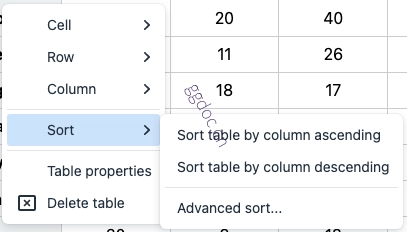
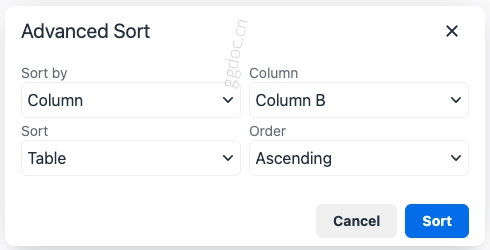
对表格行和列进行排序
可以通过以下方式按行或列值对表格进行排序:
“表格”菜单中的“排序”选项。
“表格”上下文菜单中的“排序”选项。
“表格”工具栏菜单按钮中的“排序”选项。
例如:
| 基于所选列对行进行排序 | 高级排序对话框 |
|---|---|
|
|
该插件能够对以下内容进行排序:
数值数据
文本数据
目前,排序功能会将包含字母数字数据的单元格视为文本数据。这包括作为文本字符的货币符号。
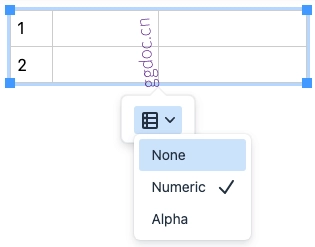
向表格添加行编号
可以向表格中添加包含一系列值的行编号列,以帮助识别表格中的行。要允许对表格进行行编号,可以使用 advtablerownumbering 工具栏按钮和菜单项。
默认情况下,提供了数字和字母值系列。可以使用 advtable_value_series 选项配置可用的值系列。
行编号列通常需要的一种自定义设置是,表格的页眉行和页脚行不包含在编号中。
可以通过使用 advtable_value_series 选项指定自定义生成器来实现此目的。
选项
以下配置选项会影响增强表格插件的行为。
advtable_value_series
advtable_value_series 选项用于配置一个或多个值系列,以便填充表格中的单元格。此选项可用于创建行标识符。
类型:Object
默认值:
{
  // 自然数系列
  numeric: {
    title: 'Numeric',
    update: true,
    resizable: false,
    generator: `GeneratorFunction` // 有关详细信息,请参阅:“创建值系列生成器”
  },
  // 英文字母系列
  alpha: {
    title: 'Alpha',
    update: true,
    resizable: false,
    generator: `GeneratorFunction` // 有关详细信息,请参阅:“创建值系列生成器”
  },
}
两个默认系列都配置为在表格发生更改时更新,并且在使用调整大小滑块时不会调整大小。
advtable_value_series 对象的每个顶级属性都用作值系列的名称及其配置。在以下示例中,有两个名为 "numbers" 和 "letters" 的值系列:
{
  numbers: {
    title: 'Numbered',
    generator: `GeneratorFunction`
  },
  letters: {
    title: 'Lettered',
    generator: `GeneratorFunction`
  },
}
系列配置
| 名称 | 值 | 要求 | 描述 |
|---|---|---|---|
title |
| 必填 | 系列在 UI 中显示的文本。 |
update |
| 可选 | 默认值: |
resizable |
| 可选 | 默认值: |
generator |
| 必填 | 有关创建值系列生成器的详细信息,请参阅:创建值系列生成器。 |
创建值系列生成器
generator 是一个回调函数,用于指定值系列的表格单元格将如何更新。回调函数会收到与生成器和表格单元格、表格单元格的行索引和列索引相关的信息。有关详细信息,请参阅:GeneratorInfo。回调函数应返回一个包含值的对象,以及可选的要应用于表格单元格的任何类和属性。有关详细信息,请参阅:GeneratorResult。
如果需要在生成器迭代之间保留系列的“状态”,可以向生成器结果添加额外的属性。该状态可通过 info 参数的 prev 属性访问。详情请见:GeneratorInfo。
GeneratorInfo
一个包含以下属性的对象将作为 info 参数传递给生成器回调函数。
| 名称 | 值 | 描述 |
|---|---|---|
sectionType |
| 表格单元格所属的部分。 |
cellType |
| 表格单元格的类型。 |
getRowType |
| 一个函数,返回表格单元格所属行的类型。'header' 行要么是 |
classes |
| 表格单元格上存在的类名。 |
direction |
| 生成器的方向。 |
prev |
| 上一次迭代的生成器结果。 |
GeneratorResult
生成器回调函数应返回一个包含以下属性的对象。
| 名称 | 值 | 是否必需 | 描述 |
|---|---|---|---|
classes |
| 可选 | 要应用到表格单元格的类名。 |
attributes |
| 可选 | 要应用到表格单元格的属性。 |
value |
| 可选 | 表格单元格的值。如果值为 |
示例:使用 advtable_value_series
tinymce.init({
  selector: 'textarea',  // change this value according to your html
  plugins: 'table advtable',
  toolbar: 'advtablerownumbering',
  advtable_value_series: {
    numeric: {
      title: 'Numeric',
      update: true,
      resizable: false,
      generator: (info, rowIndex, columnIndex) => ({
        value: rowIndex + 1
      })
    },
  }
});
示例:使用自定义生成器,将页眉行和页脚行排除在行编号之外
tinymce.init({
  selector: "textarea",  // change this value according to your html
  plugins: 'table advtable',
  toolbar: "table advtablerownumbering",
  advtable_value_series: {
    numbers: {
      update: true,
      resizable: false,
      generator: function(info, rowIndex, colIndex) {
        let prevCount = info.prev ? info.prev.count : 0;
        if (info.sectionType === 'tbody' && info.cellType === 'td') {
          let newCount = prevCount + 1;
          return {
            value: newCount,
            count: newCount
          };
        } else {
          return {
            count: prevCount
          };
        }
      }
    }
  }
});
通过这个自定义生成器,当已设置页眉行和页脚行的表格通过 advtablerownumbering 工具栏项添加行号时,页眉行和页脚行不会添加行号。
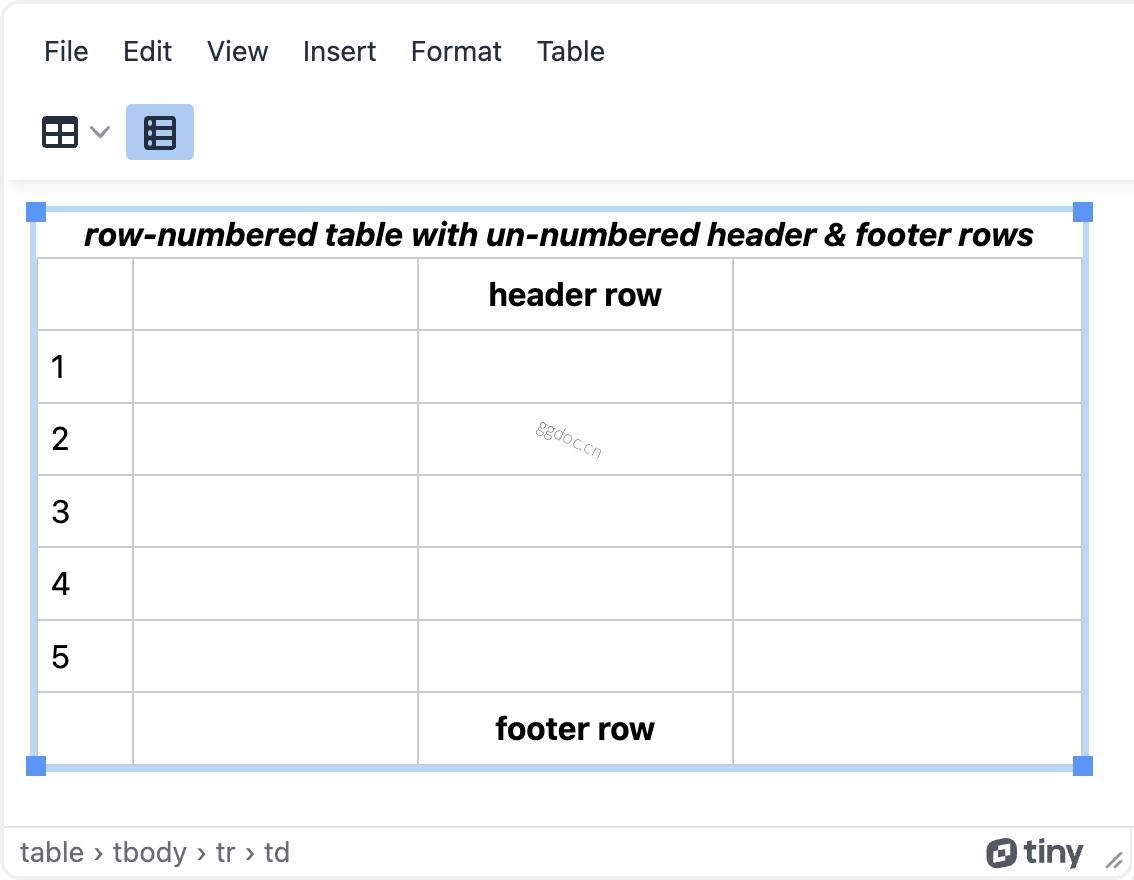
这个简单的自定义生成器仅为演示。它存在限制。最显著的限制或许是,它要求页眉行和页脚行必须在为表格添加行号之前设置。如果先添加行号,之后再设置页眉行、页脚行或两者,该生成器不会从已设置的页眉行和页脚行中移除现有的行号。
工具栏按钮
Enhanced Tables 插件提供以下工具栏按钮:
| 工具栏按钮标识符 | 描述 |
|---|---|
| 在所选表格上添加或移除(切换)行编号列。 |
可通过以下方式将这些工具栏按钮添加到编辑器:
toolbar配置选项。quickbars_insert_toolbar配置选项。
菜单项
Enhanced Tables 插件提供以下菜单项:
| 菜单项标识符 | 默认菜单位置 | 描述 |
|---|---|---|
| 表格 | 增强表格排序菜单项及相关控件。 |
| 不适用 | 在所选表格上添加或删除(切换)行编号列。 |
可以通过以下方式将这些菜单项添加到编辑器中:
menu配置选项。contextmenu配置选项。
命令
Enhanced Tables 插件提供了以下 TinyMCE 命令。
| 命令 | 描述 |
|---|---|
mceAdvancedTableSort | 打开当前选择范围或光标位置的增强表格排序对话框。 |
mceSortTableAdvanced | 执行增强表格排序。有关详细信息,请参阅使用 |
mceSortTableByColumnAsc | 根据当前光标位置或选择范围,按列升序排列当前表格。 |
mceSortTableByColumnDesc | 根据当前光标位置或选择范围,按列降序排列当前表格。 |
mceSortTableByRowAsc | 根据当前光标位置或选择范围,按行升序排列当前表格。 |
mceSortTableByRowDesc | 根据当前光标位置或选择范围,按行降序排列当前表格。 |
mceTableToggleSeries | 在所选表格上切换系列列。有关详细信息,请参阅使用 |
tinymce.activeEditor.execCommand('mceAdvancedTableSort');
tinymce.activeEditor.execCommand('mceSortTableAdvanced', false, { sortby: 'row', roworcol: '2', sort: 'table', order: 'ascending' });
tinymce.activeEditor.execCommand('mceSortTableByColumnAsc');
tinymce.activeEditor.execCommand('mceSortTableByColumnDesc');
tinymce.activeEditor.execCommand('mceSortTableByRowAsc');
tinymce.activeEditor.execCommand('mceSortTableByRowDesc');
tinymce.activeEditor.execCommand('mceTableToggleSeries', false, { name: 'numeric' });
使用 mceSortTableAdvanced
mceSortTableAdvanced 接受具有以下键值对的对象:
| 名称 | 值 | 要求 | 描述 |
|---|---|---|---|
sortby |
| 必需 | |
roworcol |
| 必需 | 以字符串形式表示的从表格顶部开始的行(从左开始的列)的零索引整数。 |
sort |
| 必需 | |
order |
| 必需 |
使用 mceTableToggleSeries
mceTableToggleSeries 接受具有以下键值对的对象:
| 名称 | 值 | 要求 | 描述 |
|---|---|---|---|
name |
| 必需 | 指定要切换的系列。系列及其关联名称使用 |
如果表格已经有一个使用 name 中指定的系列的系列列,则该系列列将从表格中删除。否则,将创建一个新的系列列,替换表格中可能存在的任何其他系列列。